How Yeeflow Service Portal helps organizations extend business applications to customers, suppliers, partners, and employees without creating another disconnected system.
Many organizations have already digitized their internal work.
Employees submit requests through online forms. Approvals move through automated workflows. Business data is stored in structured applications. Managers monitor operations through dashboards and reports.
But the moment a process involves someone outside the organization, the experience often becomes manual again.
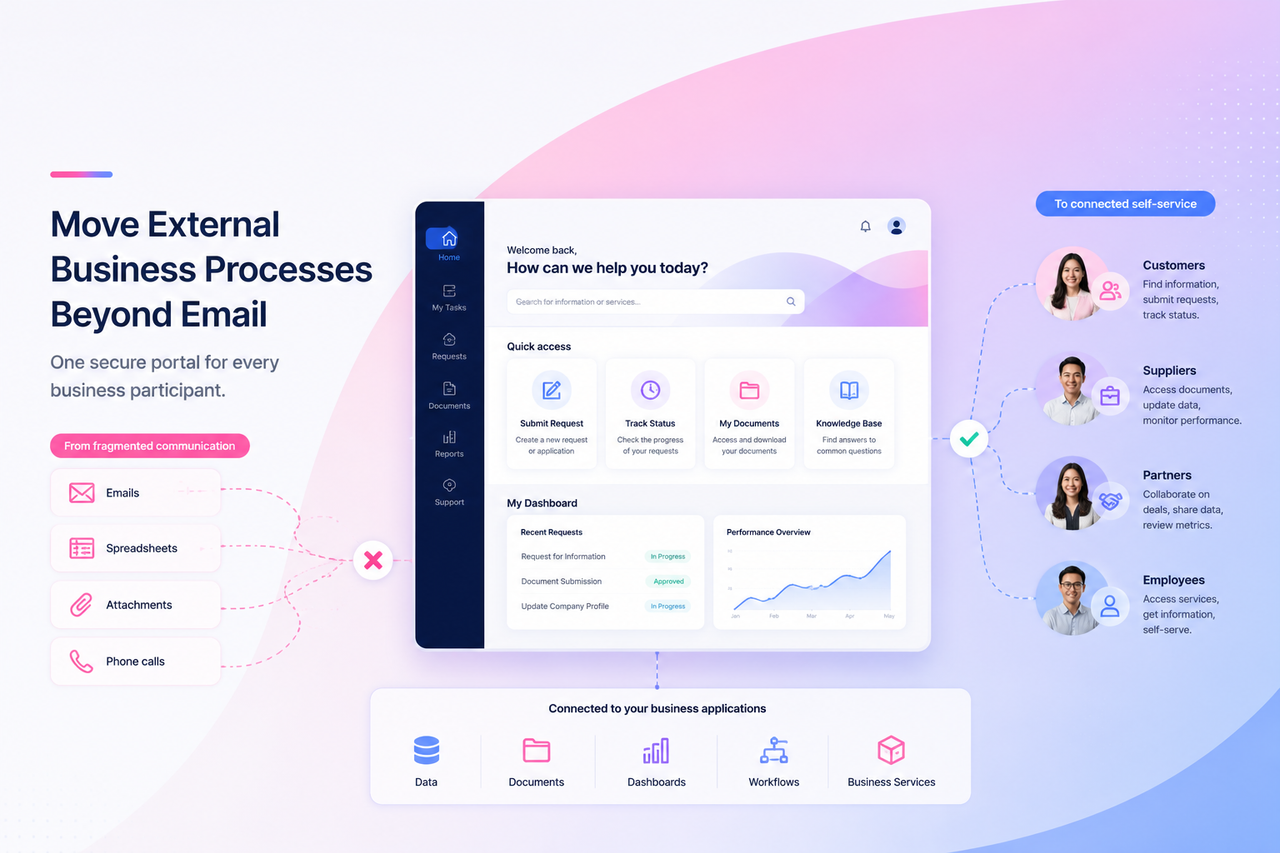
Suppliers email documents to procurement teams. Customers call support teams for status updates. Partners exchange spreadsheets and attachments. Contractors receive information through disconnected communication channels. Employees contact HR or IT because they cannot access the right self-service tools.
The organization may have modern internal applications, but the complete process is still fragmented.
This creates an important limitation:
A business process is not truly digital when external participants still depend on email, attachments, phone calls, and manual handoffs.
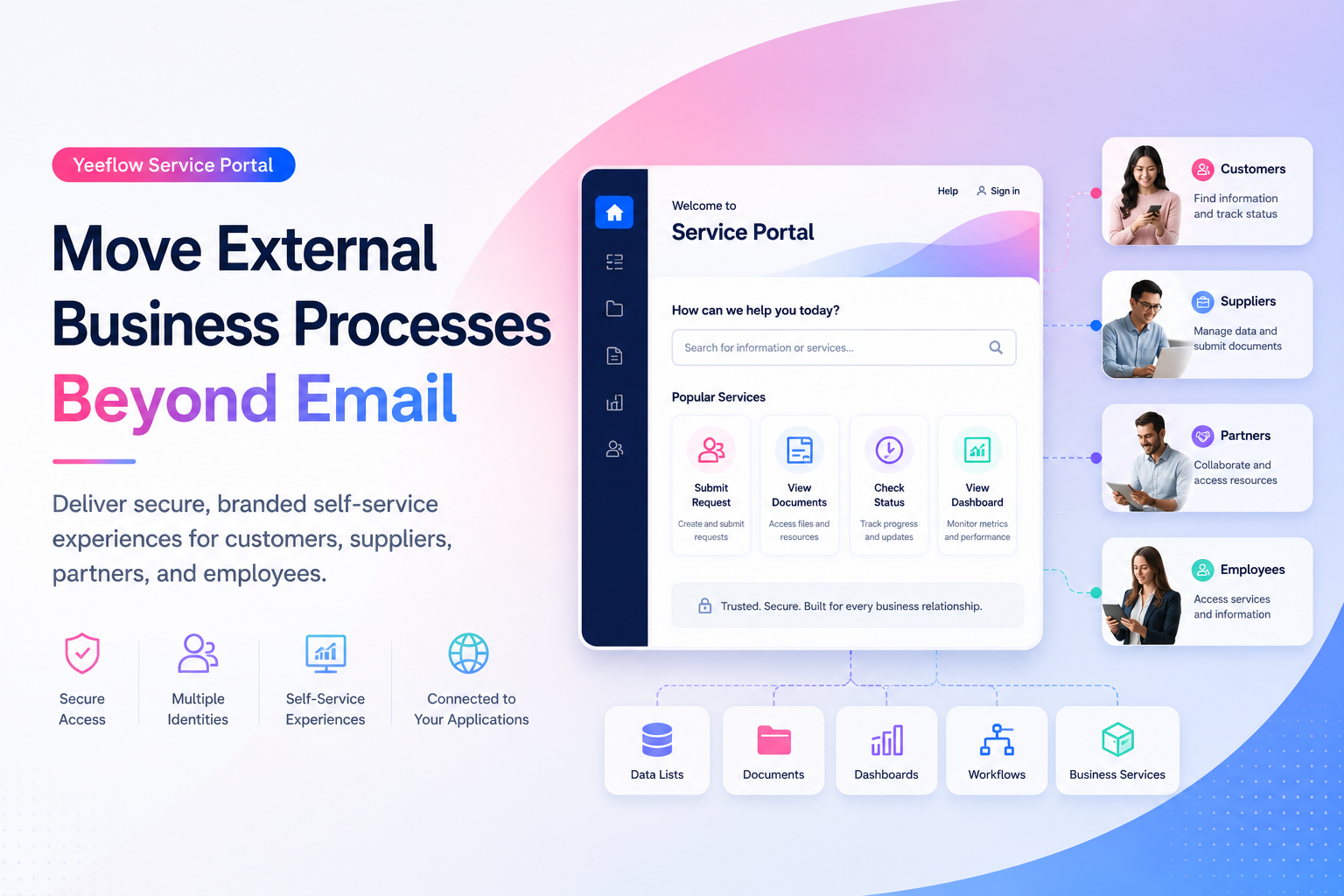
Yeeflow Service Portal helps organizations extend existing business applications beyond the internal workspace. It provides customers, suppliers, partners, employees, and other authorized users with a secure, branded way to access the information and services relevant to them.
Instead of building another standalone portal, organizations can publish selected Yeeflow application components and manage external access through the same business platform.
This supports Yeeflow’s broader direction as an enterprise AI application and execution platform in which people, data, workflows, applications, and services operate through a more connected and governed environment.
Internal digitalization does not solve external collaboration
A process can be highly automated inside an organization and still feel completely manual to the people outside it.
Consider a typical supplier onboarding process.
Internally, the procurement team may already have:
- A structured supplier database
- An approval workflow
- Compliance checks
- Contract documents
- Performance dashboards
But the supplier may still be asked to:
- Download a spreadsheet.
- Complete it manually.
- Email it to procurement.
- Send supporting documents as attachments.
- Contact the procurement team to check the review status.
- Resubmit information whenever something is missing.
The internal system may be digital, but the supplier experience is not.
The same gap appears across many business processes:
- Customers submit service requests by email.
- Partners request documents from account managers.
- Vendors call employees to check invoice or approval status.
- Candidates send sensitive information as attachments.
- Contractors depend on internal teams to retrieve business information.
- Employees contact HR or IT for routine requests that could be handled through self-service.
Every manual handoff introduces delay, duplicate work, and the possibility of incomplete or outdated information.
It also places internal teams in the role of intermediary. Instead of focusing on higher-value work, employees spend time transferring data, forwarding documents, answering status questions, and correcting information submitted through unstructured channels.
Why traditional portal approaches often create new silos
Organizations generally recognize the need for external self-service. The difficulty is finding an approach that improves the experience without adding another disconnected system.
Three common approaches each introduce limitations.
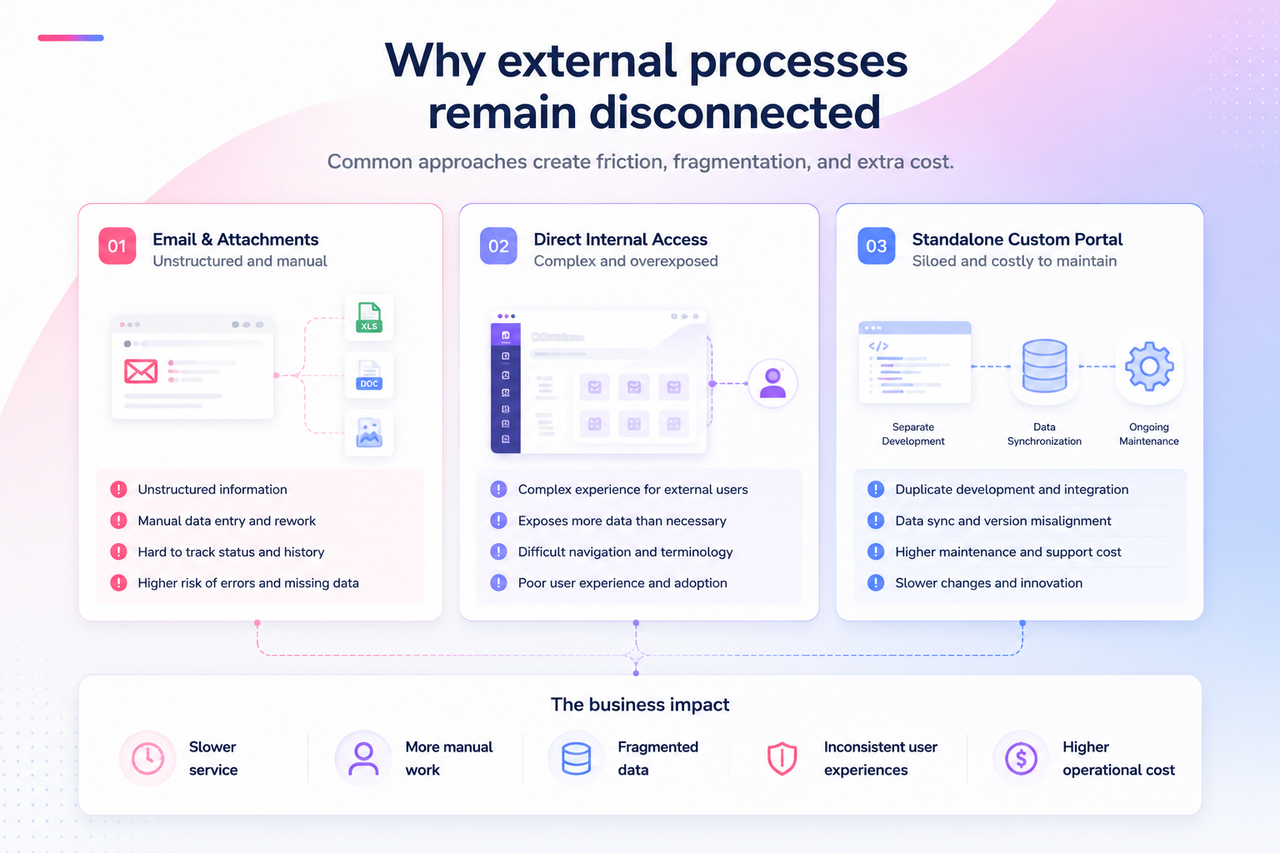
Giving external users access to internal applications
The simplest option may appear to be giving customers or partners direct access to an internal system.
However, internal applications are designed for employees and administrators. They may include complex navigation, internal terminology, unrelated applications, and data that should not be visible externally.
Even when permissions are configured, the overall experience is rarely suitable for a customer, supplier, or occasional partner user.
External users should not need to understand the internal structure of an organization just to complete a task.
Building a separate custom portal
A fully custom portal provides greater control over the experience, but it often creates a new application silo.
The organization may need to build and maintain:
- A separate front end
- A separate identity system
- New integration services
- Data synchronization logic
- Custom navigation and access controls
- A separate support and release process
The portal may look polished, but the business data and workflows still live somewhere else.
Every change to the internal application may require additional development in the portal. Over time, the portal can become expensive to maintain and difficult to keep aligned with the underlying business process.
Continuing to use email
Email requires little initial investment, which is why it remains common.
But email is not a structured business process.
Information arrives in different formats. Attachments become outdated. Status is difficult to track. Requests are forwarded between teams. Data must be copied manually into business systems.
What appears inexpensive at the beginning creates ongoing operational costs through repetitive work, slow response times, errors, and limited visibility.
The real objective is therefore not simply to “launch a portal.”
It is to connect external users directly to the relevant parts of the existing business process without exposing the entire internal environment or creating another disconnected application.
Service Portal extends existing business applications
Yeeflow Service Portal provides a different model.
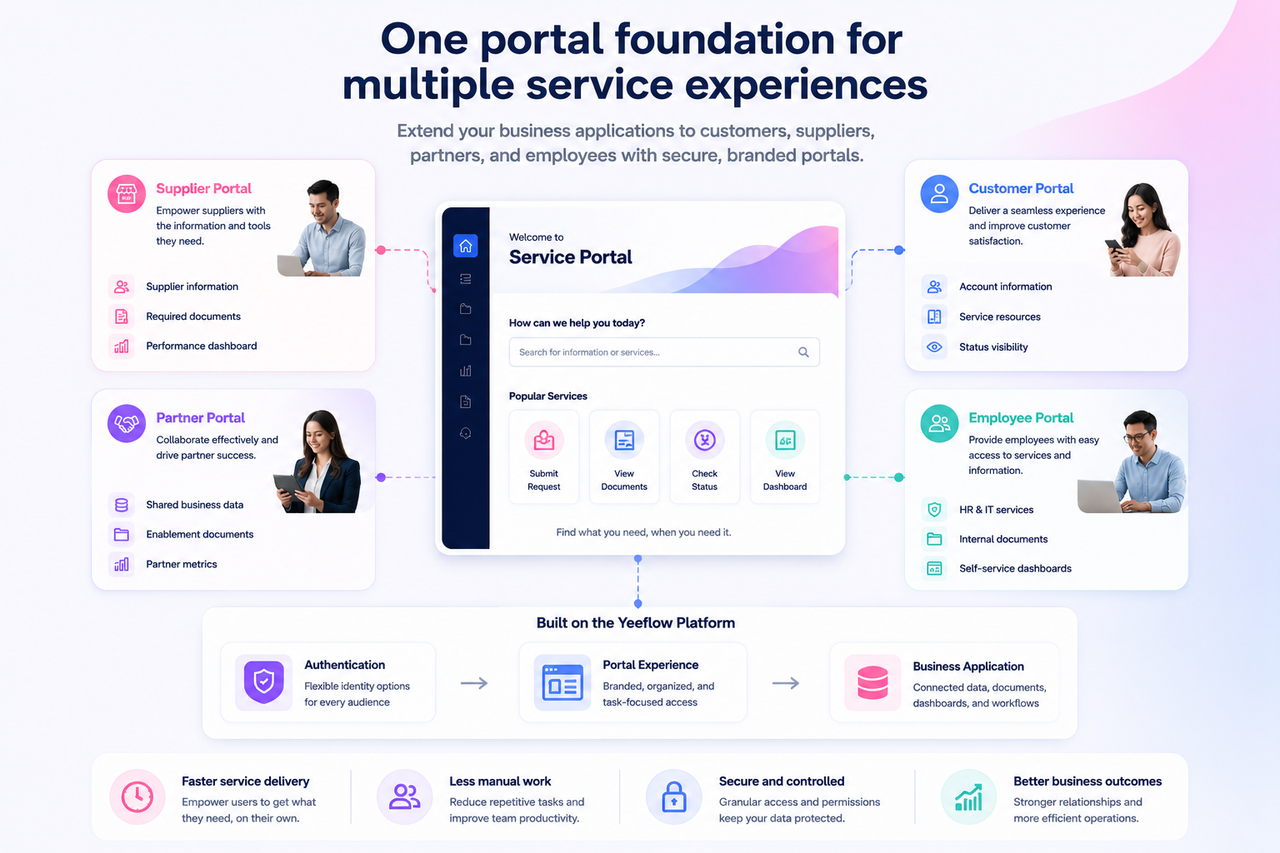
Instead of creating a completely separate system, organizations can build a portal around selected components from an existing Yeeflow application.
The portal becomes a controlled external access layer for the business application.
Portal administrators can select the content that external users need, organize it into a purpose-built navigation experience, configure authentication methods, manage portal users, and adapt the visual presentation to the organization’s brand.
This helps connect the external experience to the same operational foundation used by internal teams.
Publish only the components external users need
A portal does not need to reproduce an entire internal application.
Administrators can select relevant components such as:
- Data Lists
- Document Libraries
- Dashboards
This supports focused experiences for specific audiences.
For example, a supplier portal may contain:
- Supplier information
- Required policy documents
- Delivery performance dashboards
A customer portal may contain:
- Account information
- Service documents
- Service-level dashboards
A partner portal may contain:
- Shared opportunity data
- Enablement documents
- Performance insights
The external user sees a clear, purpose-built experience instead of the broader internal application environment.
Create public or private portal experiences
Different business scenarios require different access models.
A public portal may be appropriate for information that does not require individual authentication.
A private portal can be used when access should be limited to approved users.
This flexibility allows organizations to support a range of external experiences while maintaining an appropriate access boundary for each portal.
Organize information around user tasks
Internal applications are often organized around departments, systems, or administrative structures.
External users think in terms of tasks:
- Submit information
- Find a document
- Check a status
- Review performance
- Update an account
Service Portal allows administrators to build a simpler navigation model around these external user needs.
Navigation can include:
- Published application components
- Custom links
- Menu groups
- Icons and labels
This reduces the learning curve and makes it easier for occasional users to find the correct action.
One portal must support different identity needs
External users are not one uniform audience.
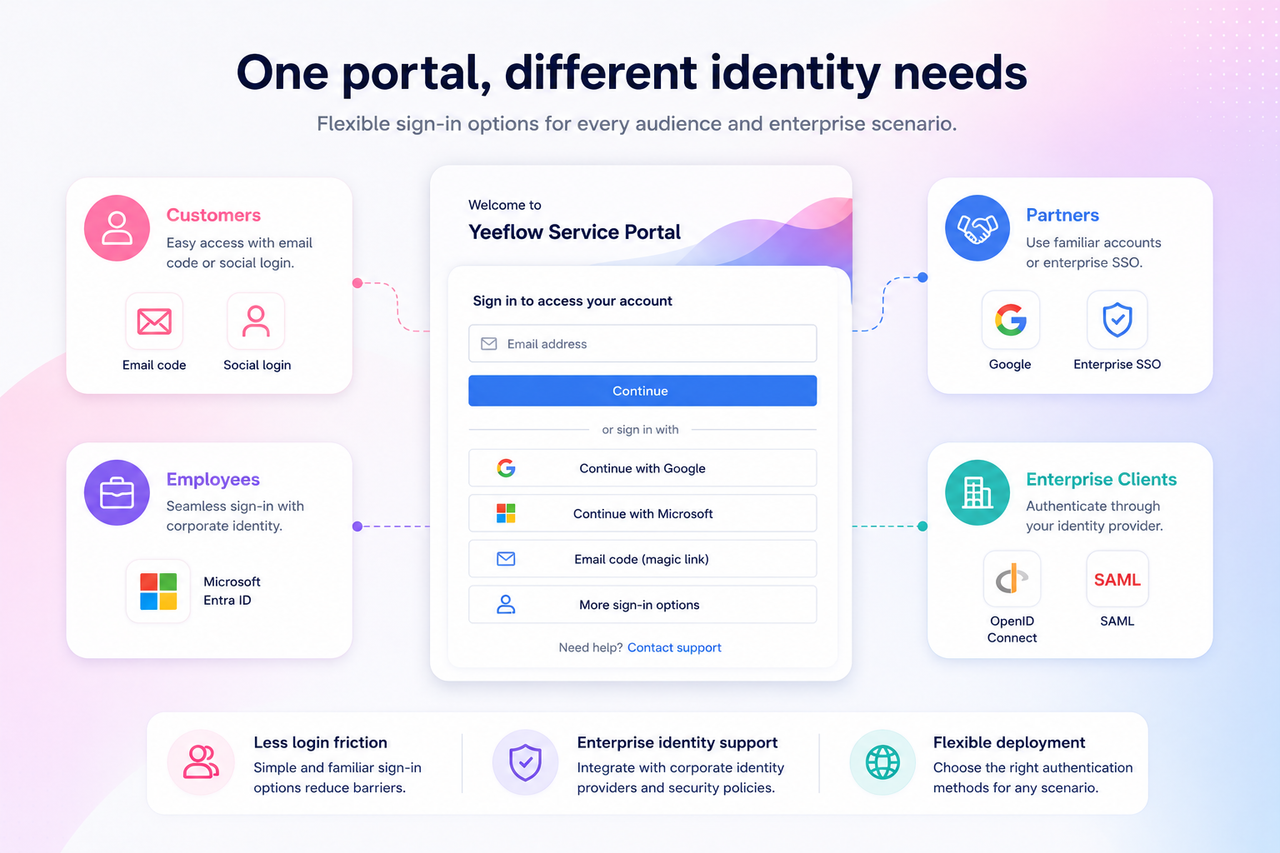
A customer, supplier, employee, partner, and enterprise client may each have different expectations for authentication.
Some users may prefer a simple email-based login. Employees may already use Microsoft identities. Partners may use Google accounts. Enterprise customers may require federation through their own identity provider.
A portal that supports only one login method creates unnecessary friction.
It may require users to create another password, prevent enterprise customers from applying their identity policies, or force administrators to develop custom authentication for every deployment.
Yeeflow Service Portal introduces a more flexible authentication model.
Portal administrators can manage multiple sign-in methods, including built-in email options and external identity providers. The current product design includes support for email and password, email verification codes, Google, Facebook, Microsoft Entra ID, custom OpenID Connect, and custom SAML configurations. The roadmap positions this as a modular identity-provider framework designed to improve enterprise fit and deployment flexibility.
Email and password
Traditional email and password authentication remains useful for users who do not have access to a supported external identity provider.
Password requirements and additional verification options can help organizations define an appropriate access policy.
Email verification code
Email verification codes can reduce password-related friction.
This option is especially useful for occasional users who may not want to create and remember another permanent password.
Consumer and business identity providers
Google and other external identity providers allow users to sign in through accounts they already use.
For enterprise scenarios, Microsoft Entra ID can help support employee, customer, or partner identities managed within Microsoft environments.
OpenID Connect and SAML
Custom OpenID Connect and SAML configurations help organizations support enterprise identity federation.
This is particularly important when a customer or partner requires users to authenticate through its own corporate identity provider.
Instead of forcing every portal user into one identity model, organizations can select the methods that fit the audience and deployment scenario.
A portal should feel like part of the organization
Access alone does not create a good external experience.
Customers and partners expect the portal to feel credible, recognizable, and consistent with the organization they are working with.
A generic internal interface can make users uncertain about whether they are in the correct place. Inconsistent branding also weakens trust, particularly when users are asked to submit documents or access sensitive business information.
Yeeflow Service Portal provides visual configuration options that allow administrators to adapt the experience without building a new front end.
Organizations can configure elements such as:
- Portal name
- Logo and favicon
- Welcome message
- Header appearance
- Navigation styling
- Typography
- Accent colors
- Card radius and shadow
- Login-page layout
- Legal links
- Custom CSS
The business value is not simply the ability to change colors.
It is the ability to give external users a focused experience that reflects the organization’s identity while remaining connected to the underlying business application.
Adapt the login experience
The login page is often the first interaction an external user has with the portal.
Administrators can configure the page presentation, including centered or split-screen layouts, brand elements, introductory messaging, accent colors, and the visibility of interface elements.
A supplier portal may use a direct and operational login experience.
A customer service portal may place greater emphasis on support messaging.
A partner portal may include program branding and quick access to relevant resources.
Each portal can present the right context before the user enters the application.
Use custom CSS for more advanced requirements
When standard visual controls are not enough, Custom CSS can provide more precise control over the presentation.
This allows organizations to adapt the portal to more specific brand or layout requirements without rebuilding the entire experience as a separate application.
Manage external users without exposing the internal workspace
A portal needs more than an attractive interface. It must provide a controlled way to manage who can enter and how access is organized.
Service Portal provides dedicated management for portal users and portal user groups.
This separation helps organizations manage external audiences without treating every customer, supplier, or partner as an internal workspace user.
Portal users
Administrators can add and manage users who need access to the portal.
This supports scenarios such as:
- Adding an approved supplier contact
- Granting a customer access to a service portal
- Onboarding a new partner representative
- Providing an employee with a dedicated self-service entry point
Portal user groups
User groups help organize portal audiences according to business needs.
Examples include:
- Strategic suppliers
- Regional partners
- Premium customers
- Contractors
- Employees
- Customer administrators
Groups can provide a more scalable foundation for organizing users as the portal audience grows.
Rather than managing every person as an isolated exception, administrators can align user organization with the business relationship.
Business scenarios
The same portal model can support different external and internal service experiences.
Supplier portal
Procurement teams often manage suppliers through emails, spreadsheets, shared drives, and disconnected systems.
A supplier portal can bring the relevant experience into one place.
Suppliers can access published business information, review documents, maintain relevant data, and view dashboards appropriate to the relationship.
The organization benefits from more structured information and fewer manual handoffs.
Customer service portal
Customers expect visibility and convenient access to service information.
A customer portal can provide a branded entry point for account data, service documents, operational information, and customer-facing dashboards.
Instead of contacting an employee every time they need information, customers can access approved resources directly.
This reduces repetitive support work and gives customers a more consistent experience.
Partner collaboration portal
Partners often need access to shared data, program documents, enablement materials, and performance information.
Giving them access to an internal workspace may expose too much complexity. Creating a separate partner system adds maintenance overhead.
A partner portal can present only the approved components and organize them around the partner’s tasks.
Each partner user can access the portal through an appropriate authentication method without navigating the organization’s internal application environment.
Employee self-service portal
Not every portal needs to be customer-facing.
Organizations can use a service portal to provide employees with a simpler entry point for HR, IT, administrative, or shared-service content.
Employees may authenticate with Microsoft Entra ID or another corporate identity provider and access the services intended for them.
This is particularly useful when the goal is to create a simple service experience rather than expose a full operational application.
Better self-service improves more than the user experience
The value of a Service Portal is not limited to convenience for external users.
It can also improve the way the organization operates.
Less repetitive administrative work
When users can access approved information directly, employees spend less time responding to routine requests, forwarding documents, and providing status updates.
More structured business data
Information entered or maintained through the portal can remain connected to structured application components instead of arriving through unstructured emails and attachments.
Fewer manual handoffs
External users can interact more directly with the business application, reducing the need for employees to transfer information between communication channels and operational systems.
Faster service delivery
Customers, suppliers, and partners no longer need to wait for an employee to retrieve every document or answer every status question.
More consistent experiences
A defined portal experience gives users one reliable place to access the information and services relevant to them.
Lower development and maintenance overhead
Because the portal is built around existing Yeeflow application components, organizations can reduce the need to maintain a separate front end and synchronization layer for every external process.
From internal applications to connected business experiences
Digital transformation cannot stop at the boundaries of the internal workspace.
Customers, suppliers, partners, contractors, and employees all participate in business processes. When their part of the process remains dependent on email and manual intervention, the organization cannot realize the full value of its applications and workflows.
Yeeflow Service Portal helps bridge that gap.
Organizations can create a focused portal, publish selected business components, configure appropriate authentication methods, organize external users, and deliver an experience aligned with their brand.
The result is not simply another website.
It is a controlled extension of the business application.
Instead of building an isolated portal for every audience, organizations can bring external participants into a more connected operating model—one that links users, data, documents, dashboards, and business services through the same enterprise platform.
Yeeflow’s strategy identifies collaboration and portals as part of the foundation for AI-powered operational systems and positions expanded portal authentication as an important capability for customer-facing and partner-facing deployments.
A process becomes truly digital when every participant can interact with it through the right experience.
With Yeeflow Service Portal, organizations can move external business processes beyond email and turn existing applications into secure, branded self-service experiences.