How OAuth Integrations and App Credentials help enterprises replace fragmented credentials and excessive permissions with secure, governed access.
Enterprise applications no longer operate in isolation.
CRM platforms need to exchange customer data with finance systems. Supplier applications need to submit information into internal workflows. Automation services need to update business records. AI Agents and Copilots increasingly need to retrieve data, invoke services, and act across connected systems.
The challenge is not simply making these connections possible.
The real challenge is making them possible without losing control over identity, permissions, credentials, and access boundaries.
Many organizations still rely on shared user accounts, static API keys, broadly scoped credentials, or custom authentication logic for each integration. These approaches may work for a small number of systems, but they become increasingly difficult to manage as the integration landscape grows.
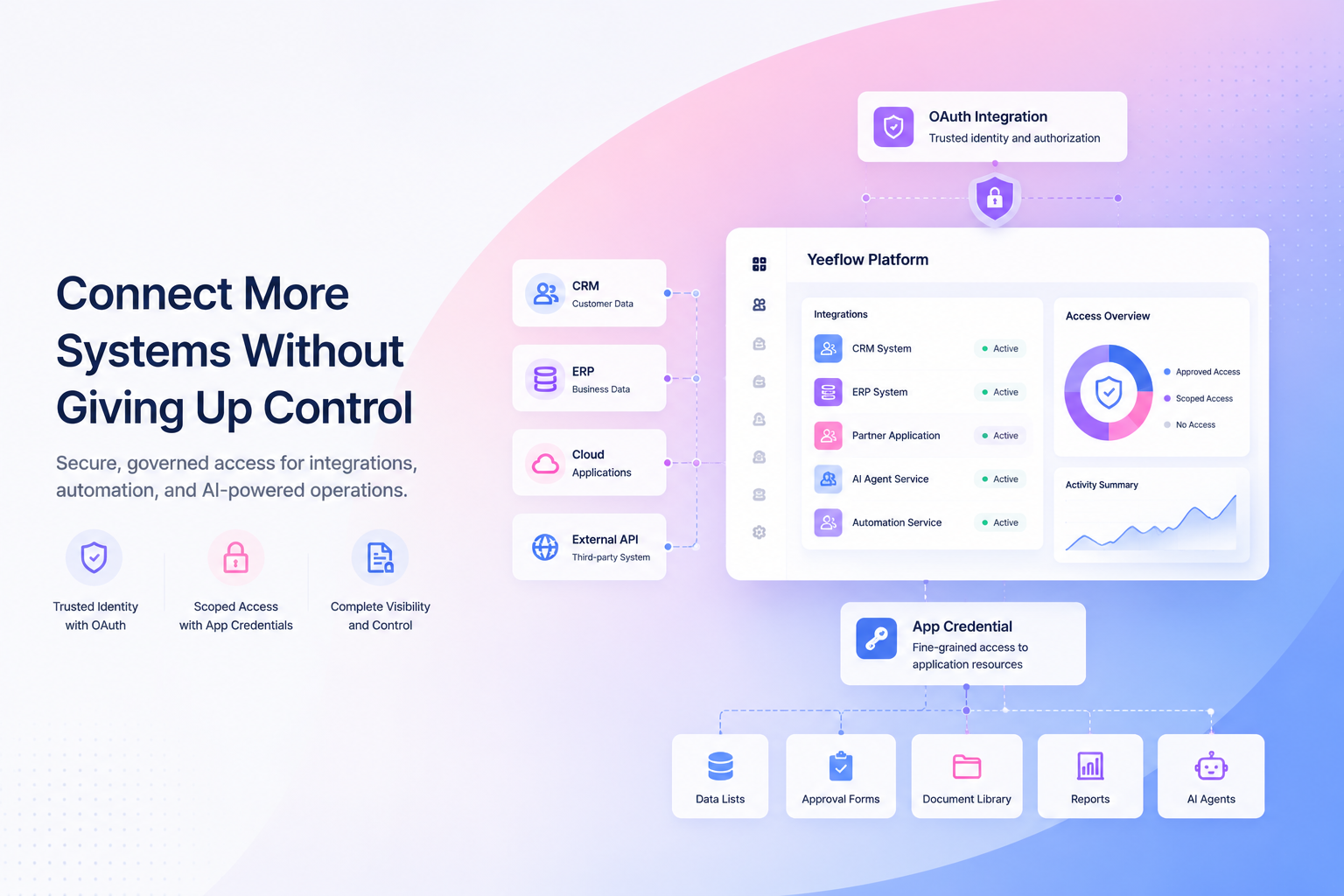
Yeeflow’s OAuth Integrations and App Credentials provide a more structured foundation for secure enterprise connectivity. Together, they help organizations establish trusted system identities, define clearer permission boundaries, manage credential lifecycles, and control access to specific application resources.
This is an important part of Yeeflow’s evolution into an enterprise AI application and execution platform: opening applications to external systems and AI while preserving governance and operational control.
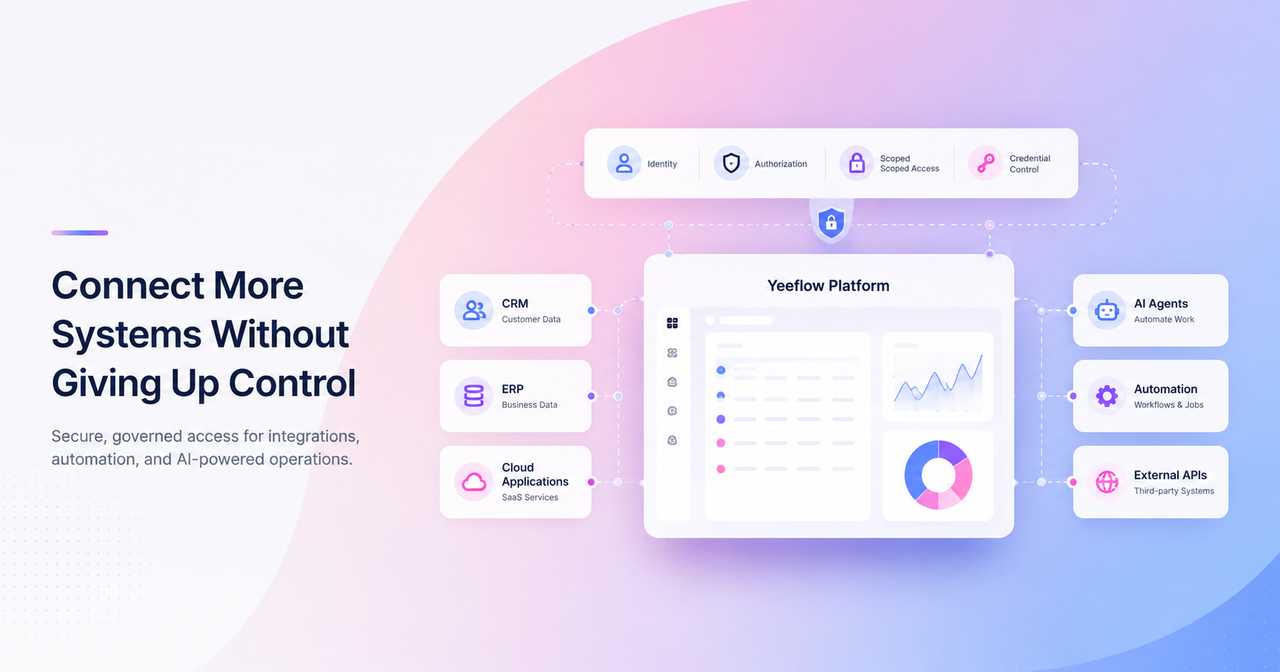
Connectivity is growing faster than access control
Most enterprises now operate across an expanding mix of business applications, cloud platforms, external APIs, automation tools, portals, and AI services.
Each new connection creates value, but also introduces another identity, credential, permission set, and operational dependency that must be managed.
In many organizations, the integration layer has grown faster than the access-control model behind it.
A team may connect a CRM to a workflow application using a shared API key. A partner solution may receive broad access because fine-grained permissions are difficult to configure. A background service may continue using the same secret for years because rotating it could interrupt production. An AI tool may receive more access than it actually needs simply to make one scenario work.
Over time, this creates a difficult trade-off:
- Open more systems and accept higher operational risk.
- Restrict connectivity and slow down automation, partner integration, and AI adoption.
Enterprises should not have to make that choice.
The objective should be controlled connectivity: every external application or service receives a distinct identity, appropriate authorization method, limited scope, and access only to the resources required for its role.
Why traditional integration credentials stop working at enterprise scale
Traditional authentication methods are not always inherently insecure. The problem is that they are often used without enough separation, lifecycle management, or permission control.
As the number of connected systems increases, several limitations become more visible.
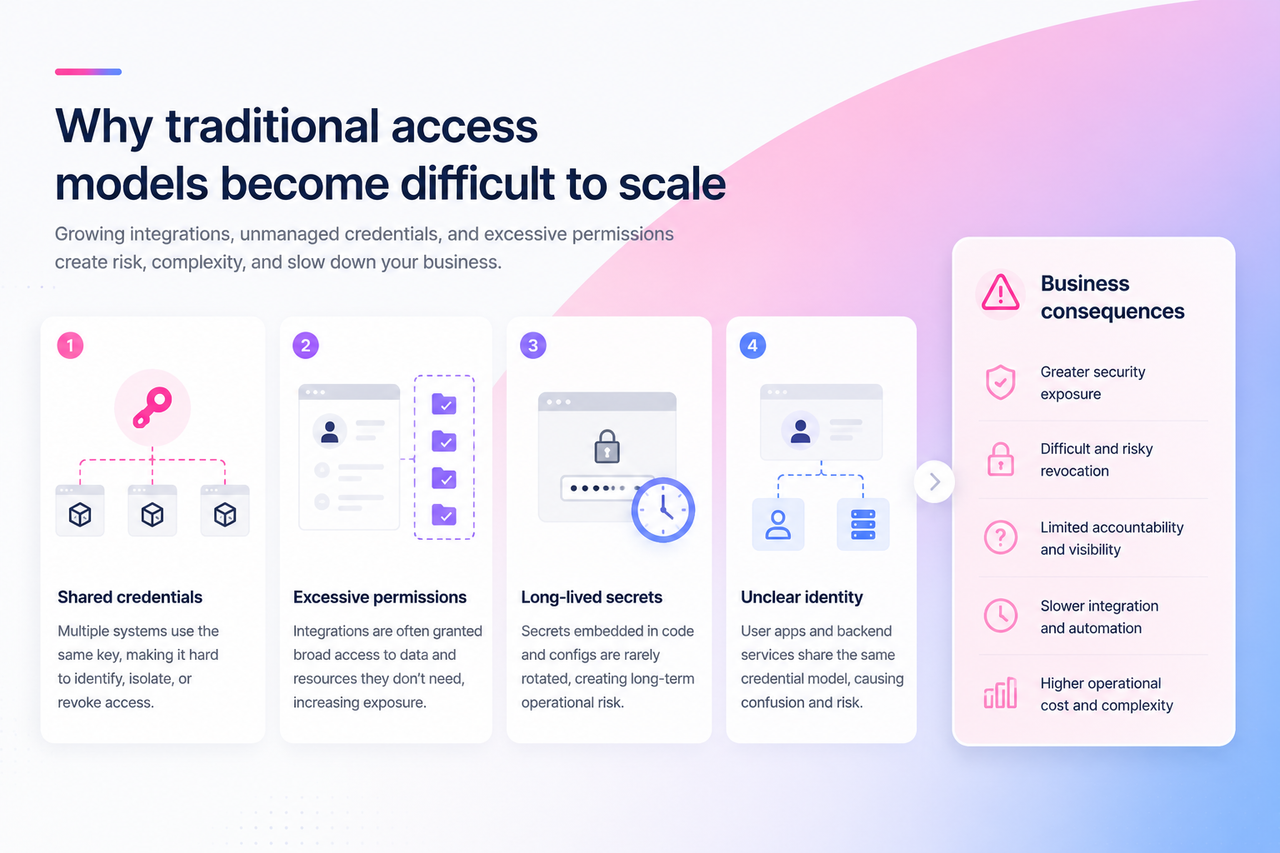
Shared credentials remove accountability
When multiple services use the same username, password, or API key, the enterprise loses a clear understanding of which system performed an action.
If a credential is compromised or one integration must be stopped, administrators may need to revoke access for every system using it.
Shared credentials also make it difficult to answer basic governance questions:
- Which application is using this credential?
- What resources can it access?
- Who owns the integration?
- When was the credential last rotated?
- Can one connection be disabled without disrupting others?
A shared credential may be easy to create, but it becomes difficult to govern.
Broad permissions increase exposure
Many integrations are initially granted more access than they need.
A reporting service may only need to read one data list, but receive access to an entire application. A partner integration may require one workflow endpoint, but gain access to a broader workspace. An AI service may only need to invoke one Agent, but be configured with permissions across multiple resources.
This over-permissioning often happens because broad access is easier to configure than precise access.
The result is a larger security and operational impact if the integration behaves incorrectly, is misconfigured, or is compromised.
Long-lived secrets create operational risk
Static secrets often remain active far longer than originally intended.
They may be embedded in code, copied between environments, stored in configuration files, or known by multiple teams. Rotating them becomes risky because administrators may not know every system that depends on them.
This creates a familiar pattern:
- A secret is created for a temporary integration.
- The integration moves into production.
- More services begin using the same secret.
- Rotation is postponed to avoid disruption.
- The credential becomes a long-term operational risk.
Credential lifecycle management therefore needs to be designed into the integration model, not treated as a manual afterthought.
One authentication model cannot serve every scenario
Not every connection represents the same type of actor.
Some applications need to act on behalf of a signed-in user. Others are backend services that operate without user interaction.
These scenarios require different authorization models.
A customer-facing web application may need a user to sign in and authorize access. A scheduled data synchronization service needs its own system identity. A platform integration may need to support both.
Using the same credential model for every scenario makes identity and accountability less clear.
OAuth Integrations establish a trusted identity layer
The first requirement for controlled connectivity is establishing a clear identity for every external application or service.
Yeeflow OAuth Integrations allow administrators to create and manage OAuth clients centrally in the Admin Center. Each integration receives its own Client ID, authorization configuration, secrets, scopes, and ownership information.
Instead of treating all external access as one generic connection, organizations can define who or what is connecting to Yeeflow.
Support the right authorization model
OAuth Integrations support different application types for different access scenarios.
User Authorization
User Authorization is appropriate when an external application needs a user to sign in and authorize access.
Common examples include:
- Web applications
- Mobile applications
- Customer-facing tools
- Partner applications
- Applications that need user identity information
In this model, the external application acts within a user-authorized context rather than using a shared account.
System-to-System
System-to-System access is designed for backend services that operate without user interaction.
Common examples include:
- Scheduled synchronization
- Integration middleware
- Automation services
- Background processing
- Server-to-server API access
The service receives its own identity rather than borrowing a user account.
Both
Some enterprise integrations need both patterns.
A platform may allow users to sign in for interactive operations while also running background synchronization services. In these cases, the same OAuth Integration can be configured to support both authorization models.
Define trusted redirect destinations
For user authorization scenarios, Redirect URIs identify where Yeeflow can safely return the authorization response after the user signs in.
By registering approved Redirect URIs, administrators reduce the risk of authorization responses being sent to untrusted or unintended destinations.
Use scopes to control requested access
OAuth scopes allow administrators to define what type of access an integration may request.
Depending on the scenario, this can include:
- Identity information
- Tenant-level information
- Workspace access
- Application access
- Read or write permissions
This creates a clearer permission contract between Yeeflow and the external application.
Rather than granting an integration broad and undefined access, administrators can define the level at which it is allowed to operate.
Manage secrets as governed credentials
Client Secrets can be created with clear names and expiration periods, allowing teams to associate each secret with an environment, purpose, or rotation cycle.
For example:
- Production Secret
- Test Environment
- Partner Integration
- Annual Rotation
This supports a more disciplined credential lifecycle and reduces dependence on one permanent secret.
Retain visibility through logs
Call Logs and Audit Logs provide two different forms of visibility.
Call Logs help administrators review how the client is being used, while Audit Logs help track configuration changes such as:
- Secret creation
- Scope changes
- Status updates
- Administrative modifications
This gives security, operations, and platform teams a better foundation for troubleshooting and governance.
App Credentials enforce application-level boundaries
OAuth establishes the identity and authorization model of the connecting application.
But enterprise control often needs to go further.
A trusted external system should not automatically receive access to every resource inside an application. It should only access the specific forms, lists, reports, documents, or AI resources required for its purpose.
This is where App Credentials add another level of control.
App Credentials allow application administrators to define access within a specific Yeeflow application.
Control access by resource type
Permissions can be configured across resources such as:
- Approval Forms
- Form Reports
- Data Lists
- Document Libraries
- Data Reports
- AI Agents
This allows organizations to define access according to the actual responsibilities of the integration.
For example:
- A reporting service may read selected Data Reports.
- A CRM synchronization process may access one customer Data List.
- A partner application may interact with a specific Approval Form.
- An AI service may invoke selected AI Agents.
- A document automation service may access one Document Library.
Choose between no access, all items, or selected items
Each resource category can be configured with an appropriate level of access:
- No Access when the integration does not need the resource.
- All Items when access to the full resource category is justified.
- Selected Items when only specific resources should be available.
This helps administrators move from broad application access to a least-privilege model.
Isolate integrations from one another
Different systems can use different App Credentials, even when they connect to the same application.
This creates stronger isolation.
If one integration is no longer needed, its credentials can be revoked without affecting other systems. If one service requires broader permissions, those permissions do not need to be shared with every other connection.
Manage expiration and secret rotation
App Credentials also provide controls for expiration and secret management.
Administrators can define token lifecycles, rotate secrets, create secondary secrets for transition periods, and deactivate outdated credentials.
This helps reduce operational disruption during credential updates.
A new secret can be introduced, the external system can be updated and tested, and the old secret can then be safely deactivated.
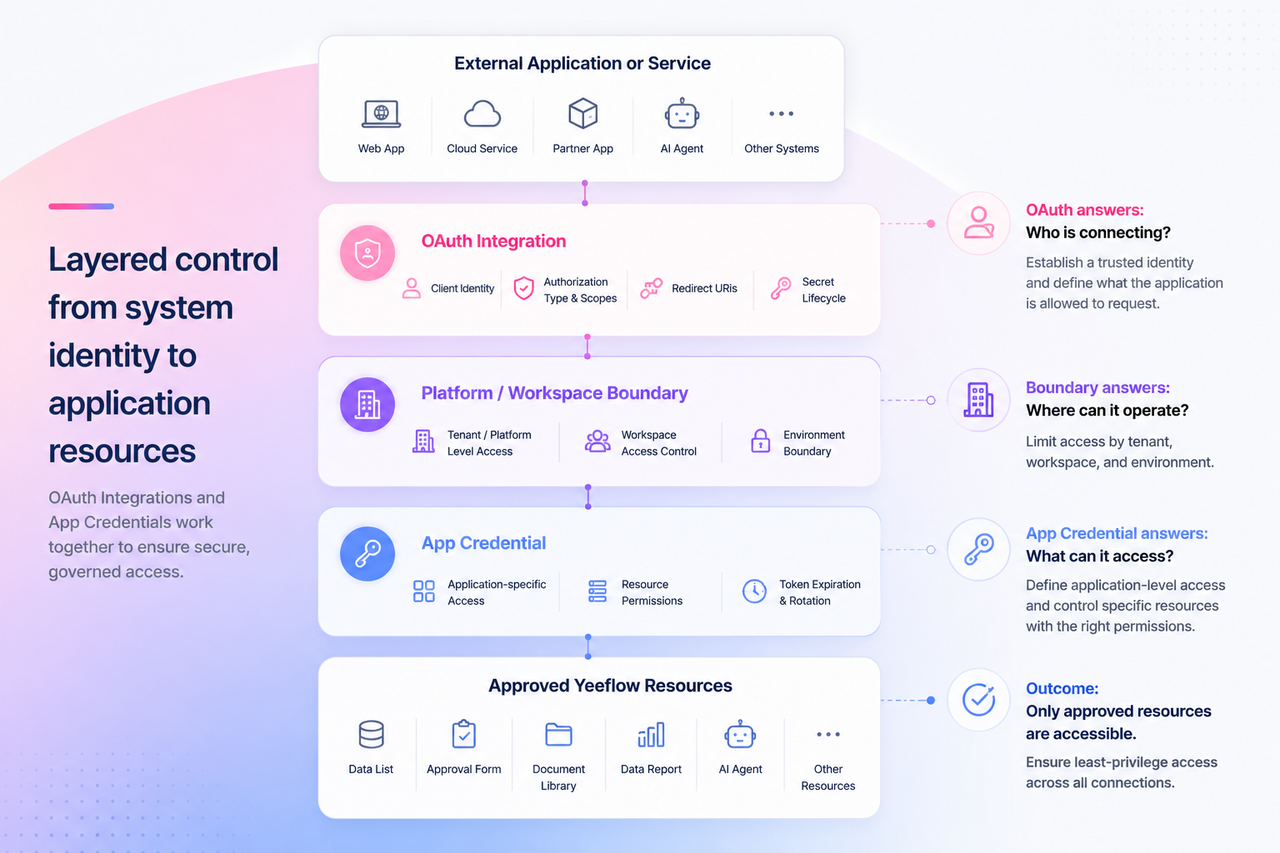
From broad access to layered control
OAuth Integrations and App Credentials solve different parts of the same enterprise problem.
OAuth Integrations establish a trusted connection at the platform level.
App Credentials refine that access at the application and resource level.
Together, they create a layered access model:
External application or service ↓ OAuth client identity ↓ Authorization method and scopes ↓ Approved platform or workspace boundary ↓ Application credential ↓ Selected application resources
This model helps enterprises answer five essential questions:
- Who is connecting?
A uniquely identified application or service. - How is it authorized?
Through user authorization, system-to-system authentication, or both. - What scope can it request?
Identity, tenant, workspace, or application permissions. - Which application can it access?
Access can be contained within a specific business application. - Which resources can it use?
Permissions can be limited to approved forms, lists, reports, libraries, or AI Agents.
This is a more scalable approach than relying on one credential that grants broad, undefined access.
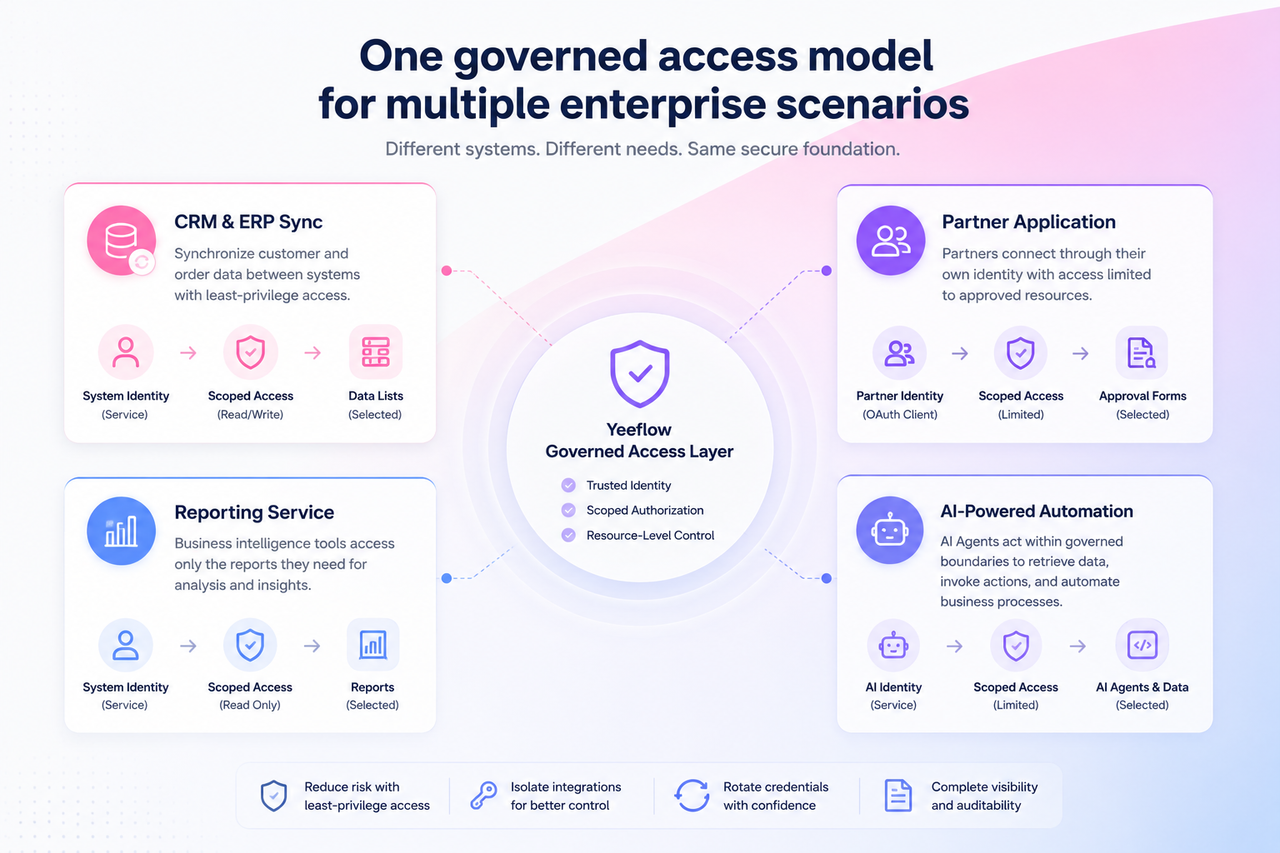
Business scenarios
The value of this model becomes clearer in real business scenarios.
CRM and ERP synchronization
A backend integration service needs to synchronize selected customer or order data between Yeeflow and an enterprise system.
Using System-to-System authorization, the service receives its own identity without relying on an employee account.
OAuth scopes can limit the connection to the approved environment or workspace. App Credentials can then restrict the service to the relevant Data Lists or reports.
The integration receives enough access to complete its work, but not enough to browse unrelated applications or resources.
Partner application access
A partner solution may need to submit records, retrieve status information, or access selected documents.
Instead of sharing an internal user credential, the partner application receives a dedicated OAuth client.
Its access can be limited to approved scopes and a specific workspace. An App Credential can further restrict it to selected forms, lists, or document libraries.
When the partnership changes, administrators can disable or revoke that integration without affecting other partners or internal services.
Data and reporting services
A business intelligence service may need to retrieve data from selected reports but should not be able to update operational records.
The integration can be configured with read-only scopes and access limited to specific reports.
This reduces the risk of a reporting tool accidentally modifying business data.
AI-powered automation
AI Agents and external AI services increasingly need access to operational data and actions.
But giving AI broad access to an application creates unnecessary risk.
With a layered access model, an AI service can receive a distinct system identity, restricted scopes, and permission to interact only with selected AI Agents or application resources.
This creates a stronger foundation for AI-powered execution because the AI operates inside defined boundaries rather than across an unrestricted application environment.
Yeeflow’s roadmap positions App Credentials, OAuth integration management, Services, resource access, and external API capabilities as key foundations for expanding platform openness and AI execution during 2026.
Better security should also improve operational agility
Security controls are sometimes seen as barriers that slow integration projects.
In practice, unclear access models often create more delays.
When teams do not know which credential to use, what permission is required, who owns the integration, or how to revoke access safely, every new connection requires additional review and custom decisions.
A structured identity and access model can improve both governance and delivery speed.
With OAuth Integrations and App Credentials, organizations can establish repeatable patterns for:
- Creating dedicated identities for connected systems
- Selecting the appropriate authorization model
- Defining scopes based on business need
- Limiting access to selected resources
- Rotating secrets without unnecessary downtime
- Disabling one integration without affecting others
- Reviewing calls and administrative changes
This allows enterprise IT teams to approve new connections with greater confidence and gives application teams a clearer path for implementing integrations.
A stronger foundation for open and AI-powered applications
Enterprise applications need to become more connected.
They must exchange data with other platforms, support partner ecosystems, enable automation, and increasingly allow AI to participate in business processes.
But openness without control creates risk.
The objective is not simply to expose more APIs. It is to create a trusted execution environment where each application, service, and AI capability operates with a clear identity and defined permissions.
OAuth Integrations help establish who or what is connecting to Yeeflow.
App Credentials help determine what that connection can access inside an application.
Together, they allow organizations to open Yeeflow applications to external systems, services, partners, and AI while maintaining control over identities, credentials, scopes, and business resources.
Enterprises should not have to choose between connectivity and control.
With Yeeflow, they can build both into the same platform.ex