Overview
What this template helps teams build
Overview
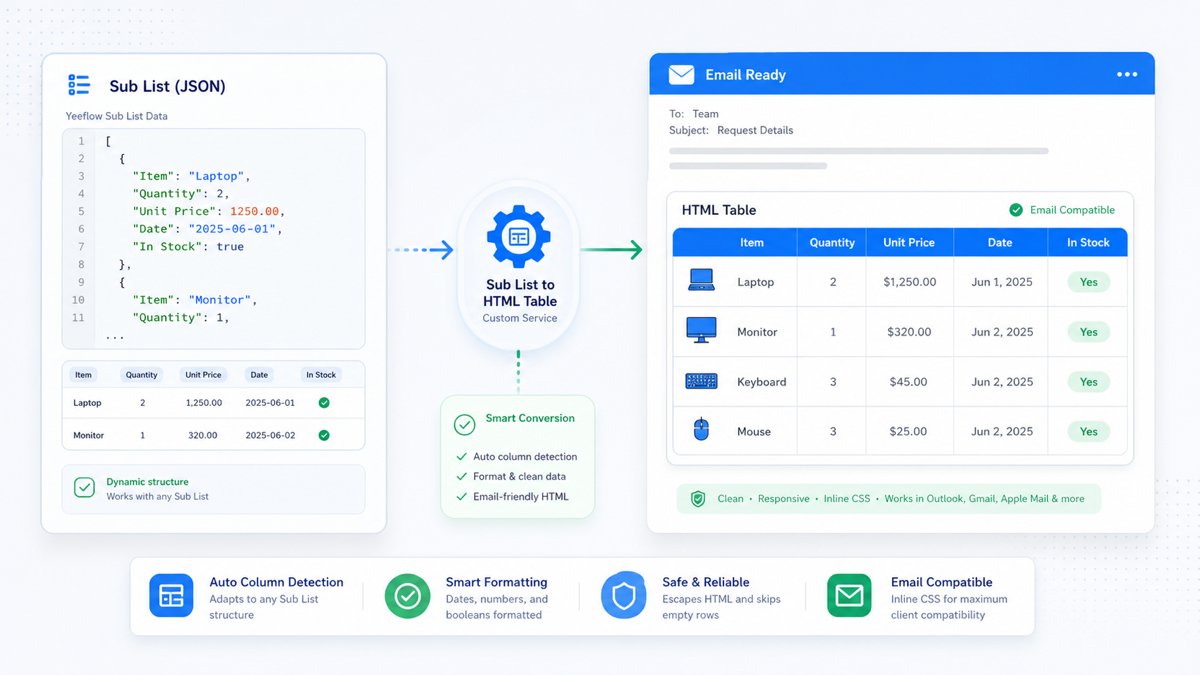
The Sub List to HTML Table template converts data from any Yeeflow Sub List into a clean, modern HTML table that can be embedded directly into email templates, approval notifications, workflow messages, documents, or web pages.
Unlike solutions designed for a specific business scenario, this template works with any Sub List structure. It automatically detects the business columns from the input data, generates the table header, formats the rows, and produces responsive HTML using only inline CSS for maximum compatibility with email clients.
The generated HTML is optimized for Microsoft Outlook, Gmail, Apple Mail, and most other major email clients.
When to use
Use this template whenever you need to present Sub List data in a readable table format outside of a Yeeflow form.
- Purchase Order line items
- Expense claim details
- Sales quotation items
- Invoice line items
- Asset lists
- Employee lists
- Customer contacts
- Project tasks
- Equipment assignments
- Inventory records
- Approval detail lists
- Workflow notification emails
- AI-generated email responses
- PDF or document generation
- Any workflow that needs to display Sub List records as an HTML table
Features
- Automatically detects business columns from the Sub List JSON
- Supports any number of columns and rows
- Excludes Yeeflow system fields such as _id and __ctxidx
- Automatically skips completely empty rows
- Formats dates into a readable format
- Formats numbers with thousands separators
- Displays Boolean values as Yes or No
- Escapes HTML special characters for safety
- Produces compact, professional table layouts
- Uses only inline CSS for maximum email compatibility
- No external CSS or JavaScript required
- Works with any Yeeflow application without modification
Input
Input variable: subListJson
Use the JSON array generated from any Yeeflow Sub List control. In a workflow, choose the Sub List variable and set it as the value for the subListJson input variable.
Example: [{ "Employee ID": "EMP001", "Employee Name": "John Smith", "Department": "Sales", "Position": "Manager" }, { "Employee ID": "EMP002", "Employee Name": "Emily Chen", "Department": "Finance", "Position": "Accountant" }]
Output
Output variable: htmlTable
Returns a complete HTML table using inline CSS that can be directly inserted into an Email Template, Email Body, Rich Text field, HTML control, PDF generation, document template, AI Agent response, Copilot response, or workflow notification.
How it works
- Receives the Sub List JSON.
- Parses the JSON automatically.
- Detects all business fields.
- Removes internal Yeeflow system fields.
- Builds the table header.
- Generates one row for each valid record.
- Formats dates, numbers, and Boolean values.
- Applies a professional email-friendly style.
- Returns the HTML table.
No configuration is required.
Best practices
- Use this template whenever the table structure is dynamic or unknown at design time.
- In workflow configuration, map the Sub List variable directly to the subListJson input variable.
- Pass the complete Sub List JSON instead of manually extracting individual fields.
- Insert the returned HTML directly into HTML-supported email templates or document generators.
- For large datasets, consider limiting the number of displayed rows to improve email readability.
- If additional branding is required, customize the inline CSS after generation or extend the service to accept optional style parameters.
Common use cases
- Expense Approval Email: display expense details as a formatted table.
- Purchase Order Notification: show purchased items in an email.
- Sales Quotation: display quotation line items.
- Employee Onboarding: list assigned equipment and tasks.
- Workflow Notification: show approval records.
- AI Agent: return structured table output.
- Copilot: generate readable business tables.
- Document Generation: insert HTML tables into generated documents.
Notes
- This template is generic and is not tied to any specific business process.
- The generated HTML is designed for maximum compatibility across major email clients.
- The service automatically adapts to different Sub List structures without requiring code changes.
- The output is self-contained and uses inline CSS only, making it suitable for environments where external stylesheets are not supported.
Download
Custom service package
Import this YCS file into Yeeflow to reuse the backend service logic, then configure workflow, AI Agent, Copilot, or automation callers around your own data source and permissions.