Hi there,
We are pleased to announce an update to ourAutonumberfield functionality, designed to offer you greater flexibility and control over the numbering of your records. 🌟 This enhancement introduces two new options within the field settings, catering to your diverse needs. Below, you’ll find an overview of the updated features:
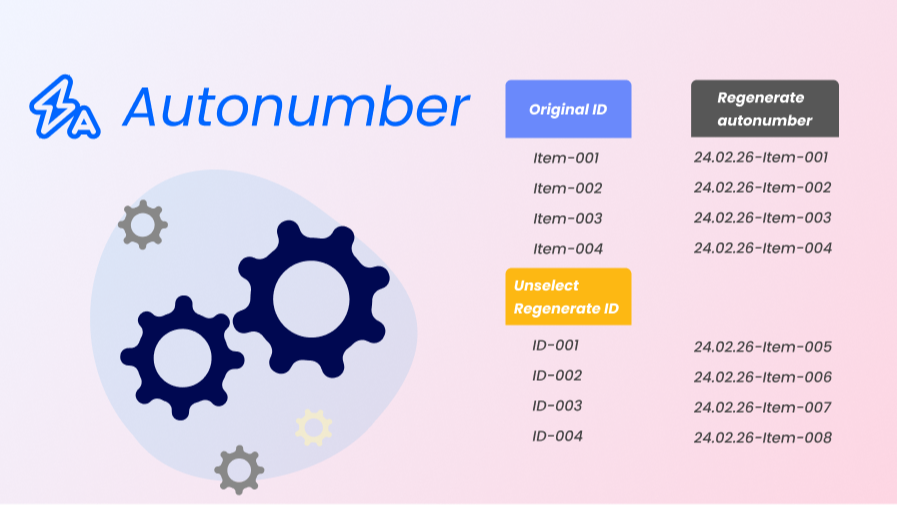
- Apply to Records Without Autonumber: This option becomes available when creating an Autonumber field for the first time. By default, this option is not selected, ensuring no automatic changes to your existing data structure. When activated, it allows for the generation of autonumbers for records that previously lacked them, ensuring consistency and completeness across your dataset.📝
- Regenerate Autonumber for Records with Values: This is only available when you edit an existing autonumber field, this option is also unselected by default to maintain the integrity of your existing numbering scheme. Upon selection, it enables the regeneration of autonumbers for records that already contain values. This functionality is particularly useful for maintaining a sequential and organized numbering system after autonumber settings have been changed.🔁
These updates are designed to enhance the flexibility and usability of the Autonumber field, ensuring it can be tailored to meet the specific requirements of your workflows. For those unfamiliar with the Autonumber field type or seeking more detailed information, we recommend reviewing our support article here:Autonumber Field Type.