At 9:14 a.m., a customer notices water dripping beneath the kitchen sink. They open WhatsApp, type “My filter is leaking,” and attach a photo.
The message arrives instantly. The work does not.
Someone still has to identify the customer, understand the problem, preserve the photo, decide whether the issue is urgent, assign the right person, arrange a visit, and keep the customer informed. If the message is forwarded between colleagues, the image is downloaded to a desktop, and the promised follow-up lives only in somebody’s memory, the convenience of WhatsApp can quickly become operational confusion.
We built the Yeeflow WhatsApp Messaging Demo to explore a better pattern. The aim was not to create one more inbox. It was to connect a familiar customer channel to the records, responsibilities, and workflows that make service delivery reliable.
The reference solution uses Meta WhatsApp Cloud API for messaging, Azure Functions as the integration boundary, and Yeeflow as the application and operational system of record. Along the way, five lessons became clear.
The message is not the work. The message is the moment when the work begins.
Lesson 1: WhatsApp should be the conversation layer—not the system of record
Customers choose WhatsApp because it is immediate and familiar. They should not need to understand the applications, queues, or approval rules behind the conversation. But the qualities that make chat convenient do not automatically make it suitable for managing a business process.
A message thread can tell you what was said. It may not tell you who owns the request, what deadline applies, which business record is affected, whether a promised action was completed, or which team should act next. When the conversation itself becomes the unofficial system of record, teams compensate with screenshots, spreadsheets, forwarding, and manual copy-and-paste.
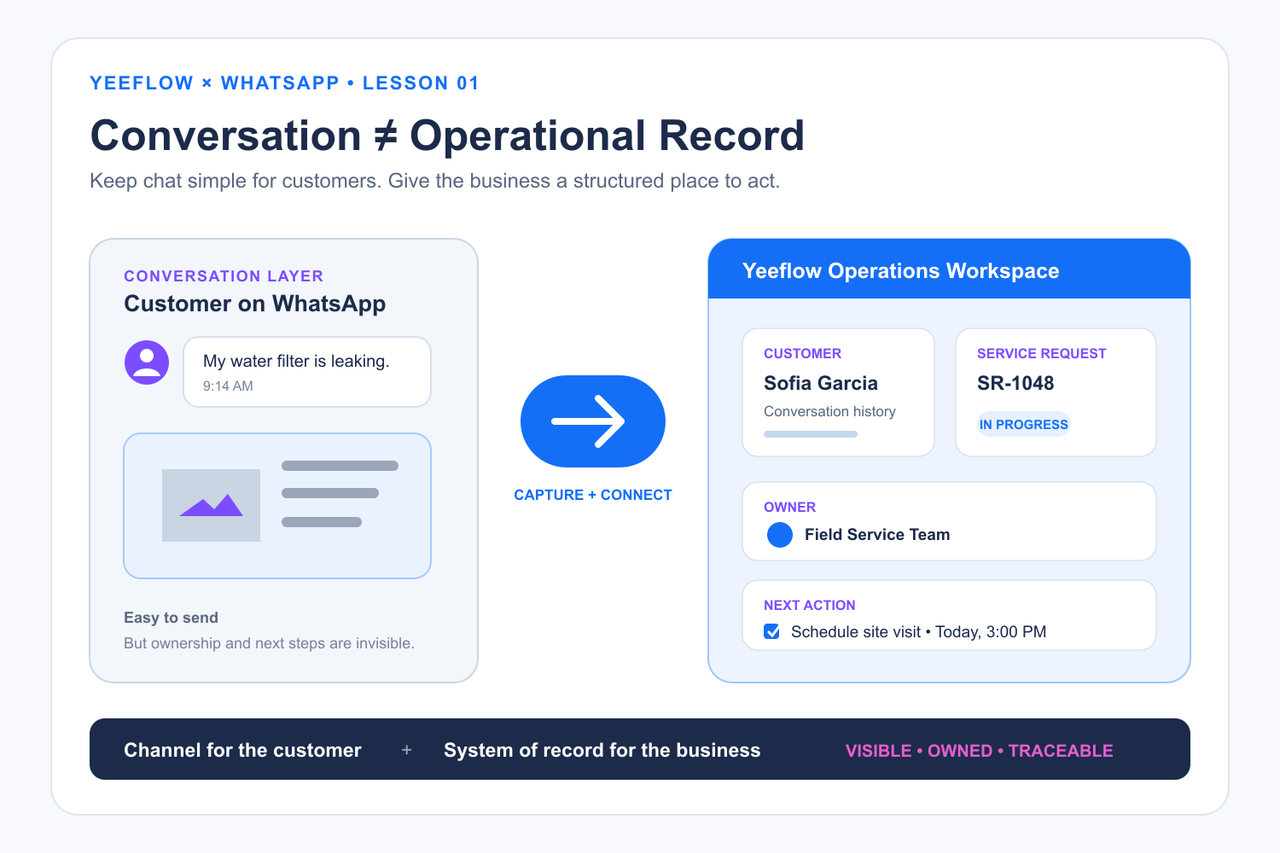
Our first design decision was therefore to keep the channel and the operational record separate. In the demo, a Customer represents the person, while a WhatsApp Message represents each inbound or outbound interaction. The message record carries structured information such as direction, time, media type, attachment, provider reference, and delivery state. It can then be connected to a service request, case, order, appointment, asset, or another business object.
That distinction matters. A webhook is a technical notification that something happened; it is not automatically a service case. A chat attachment is a file; it is not automatically governed evidence. Yeeflow gives the organization a place to decide what the interaction means and what business action it should create.
For example, a property-services team might turn “The air conditioner is leaking” into a maintenance request. An insurer might connect a damage photo to a claim. A distributor might link a product enquiry to an account and a follow-up task. WhatsApp remains the conversation layer. Yeeflow holds the business context and process.
Lesson 2: Every conversation needs an owner, a business object, and a next action
Many service failures begin with a message that everybody can see but nobody clearly owns. One person assumes a colleague has replied. Another sees the request but cannot tell whether a case already exists. The customer follows up, and the team spends time reconstructing what happened.
A useful integration should answer three questions immediately:
- Who is responsible? The request needs an accountable owner or team.
- What is this about? The conversation needs a relationship to the relevant customer and business object.
- What happens next? The next action, state, or exception must be visible.
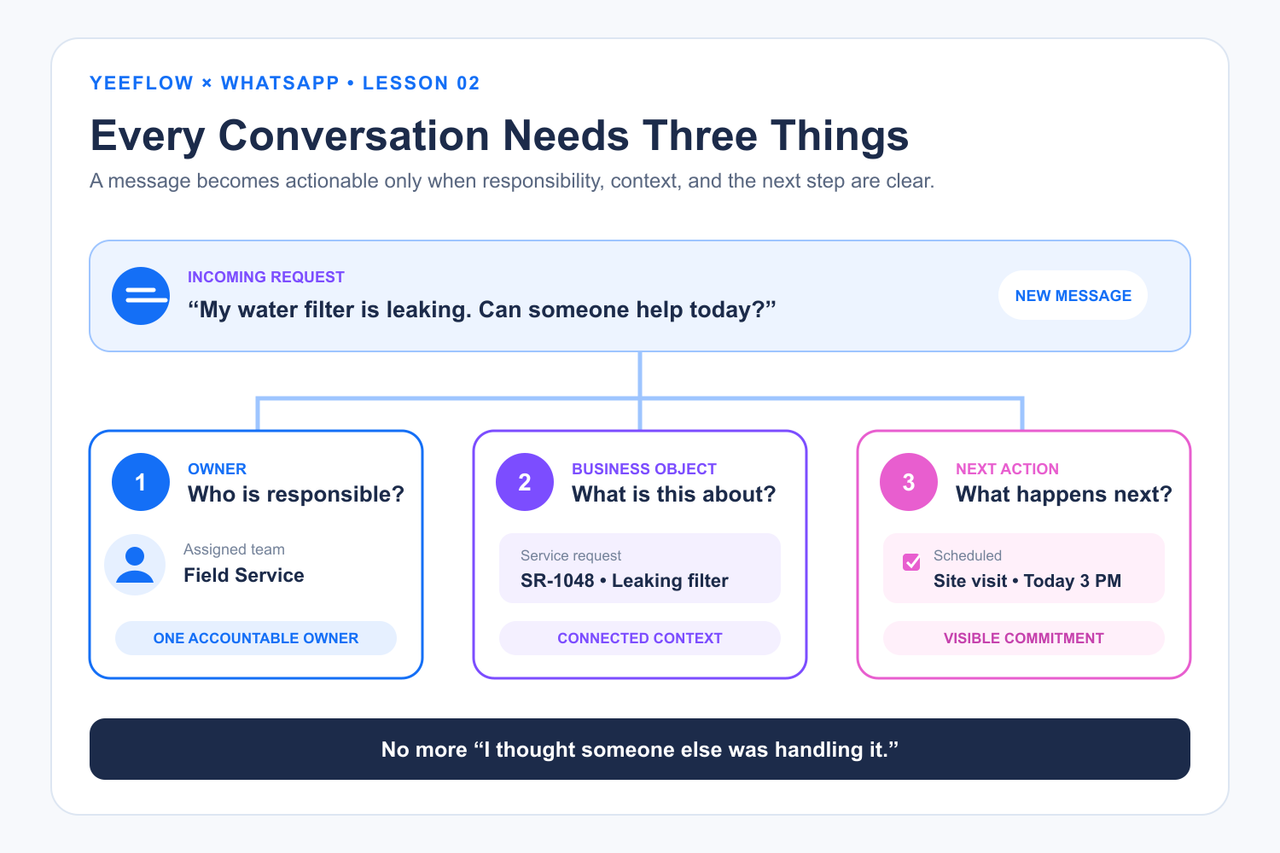
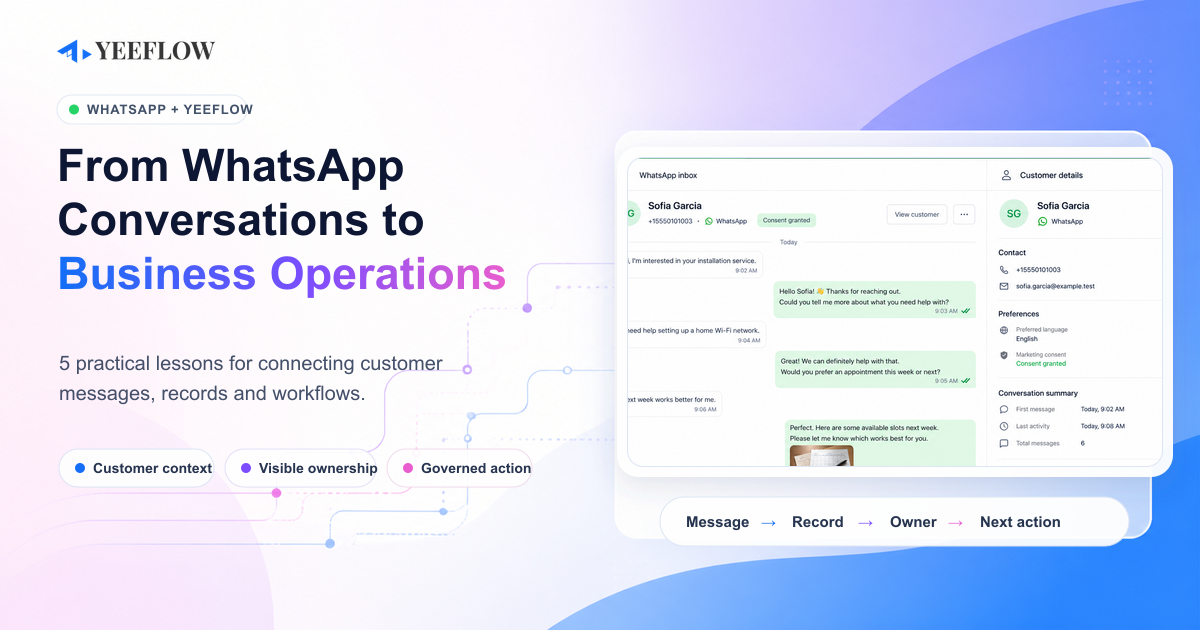
In our reference application, the customer-centric workspace places the selected customer, conversation history, message attachments, and related details in one operating view. An inbound message can trigger routing, assignment, notification, review, approval, or creation of another record. An operator can respond from the same context instead of switching between a personal inbox and a business application.
This is more than a user-interface improvement. It changes the operating model. A sales enquiry can become a follow-up owned by an account representative—but a message alone should not be treated as a qualified opportunity. A confirmed need, relevant stakeholder, commercial potential, timing, and agreed next step still require discovery. Similarly, a service acknowledgement can be automated, while the actual resolution remains assigned to a person with the right skills.
The point is not to turn every sentence into a workflow. It is to make sure that important conversations do not disappear between channels and teams.
Lesson 3: A photo is not just an attachment—it may be operational evidence
In many customer journeys, the most useful part of the message is not the text. It is the leaking pipe photo, damaged-package image, equipment label, signed document, voice note, or short video attached to it.
If that media remains only in the chat, employees may download it, rename it, forward it, or lose the connection to the original request. The business then has an image but not dependable evidence: no consistent customer relationship, no clear source, and no governed place in the process.
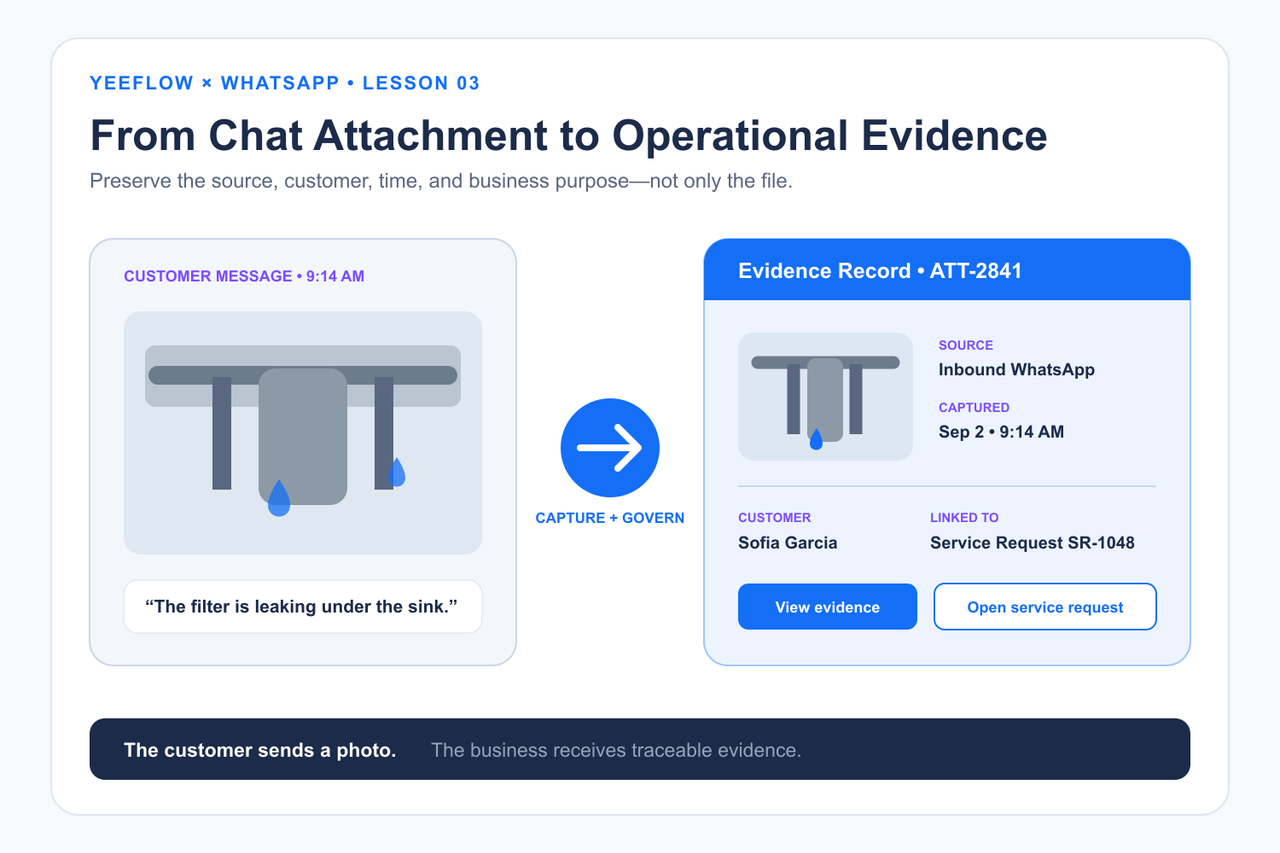
The demo handles inbound images, video, audio, documents, and stickers. Azure Functions retrieves the media from Meta, and the integration stores it in Yeeflow’s native Attachment field on the corresponding message record. Supported images can be previewed in the conversation view; documents can be opened or downloaded by authorized users.
This turns media into something a workflow can use. A field-service coordinator can review a fault photo before dispatch. A claims team can keep evidence with the claim record. A dealer-support team can connect a serial-number image to the right asset. The file is still easy for the customer to send, but it becomes part of a traceable operational history for the business.
One implementation detail also shaped the outbound design: the reference workflow sends the first selected attachment with a message. That deliberate limitation keeps the example understandable. A production design may need multi-file rules, type and size validation, malware scanning, retention policies, and different treatment for sensitive evidence.
Lesson 4: Automate the routine, keep people in consequential decisions
Messaging creates pressure for instant responses, which can make “automate everything” sound attractive. But speed without control can produce the wrong answer faster.
We found it more useful to separate routine transport from consequential judgment. The integration can automatically validate webhook events, prevent duplicate processing, match a customer by WhatsApp identifier, create a minimal customer when appropriate, save the message and media, and update provider delivery information. Yeeflow workflows can handle repeatable routing, notifications, reminders, and record updates.
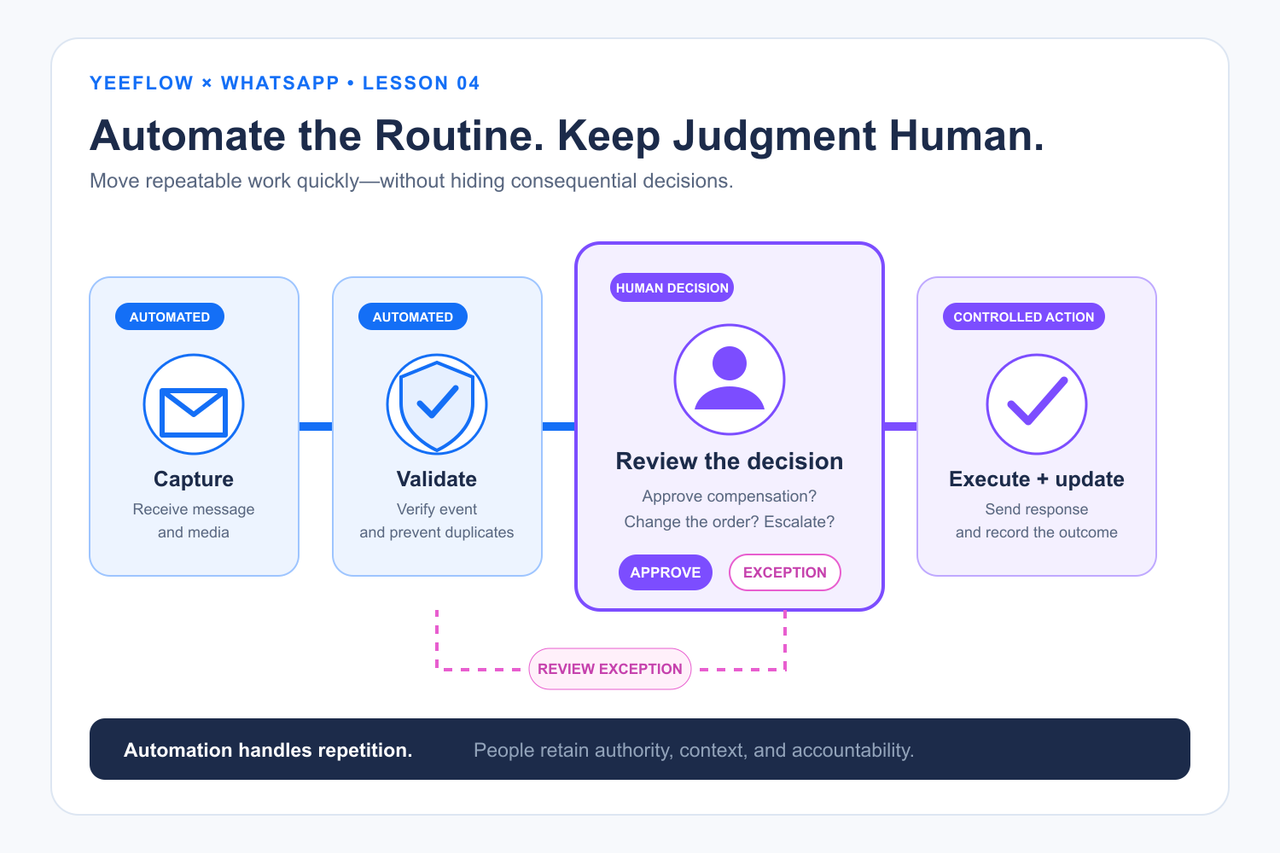
People should remain involved where context, authority, or risk matters: approving compensation, changing an order, assessing a complaint, deciding whether evidence is sufficient, or making an exception to policy. Yeeflow permissions, assignments, review steps, and workflow branches let each organization define that boundary.
Delivery tracking illustrates why this distinction is important. When an API accepts an outbound request, it does not necessarily mean the customer has received or read the message. The reference solution stores the provider message ID and processing result, then uses later status callbacks to update delivery state. “The API call succeeded” and “the communication reached the customer” are different facts.
We also kept Azure storage focused on technical responsibilities such as idempotency, delivery correlation, and bounded audit. Customer and operational records remain in Yeeflow. This preserves a clear source of truth and avoids turning the integration layer into an accidental second business database.
Lesson 5: Start with one customer journey, then build outward
The fastest way to make an integration unwieldy is to begin with every channel, team, message type, and exception at once. A better starting point is one journey with a clear operational outcome.
Consider the leaking-filter example:
- The customer sends a WhatsApp message and photo.
- The integration creates a message record and associates it with the customer.
- Yeeflow creates or updates a service request and assigns an owner.
- The team reviews the evidence, arranges a visit, and records the decision.
- The customer receives an update through WhatsApp.
- The conversation, attachment, status, and operational history remain connected.
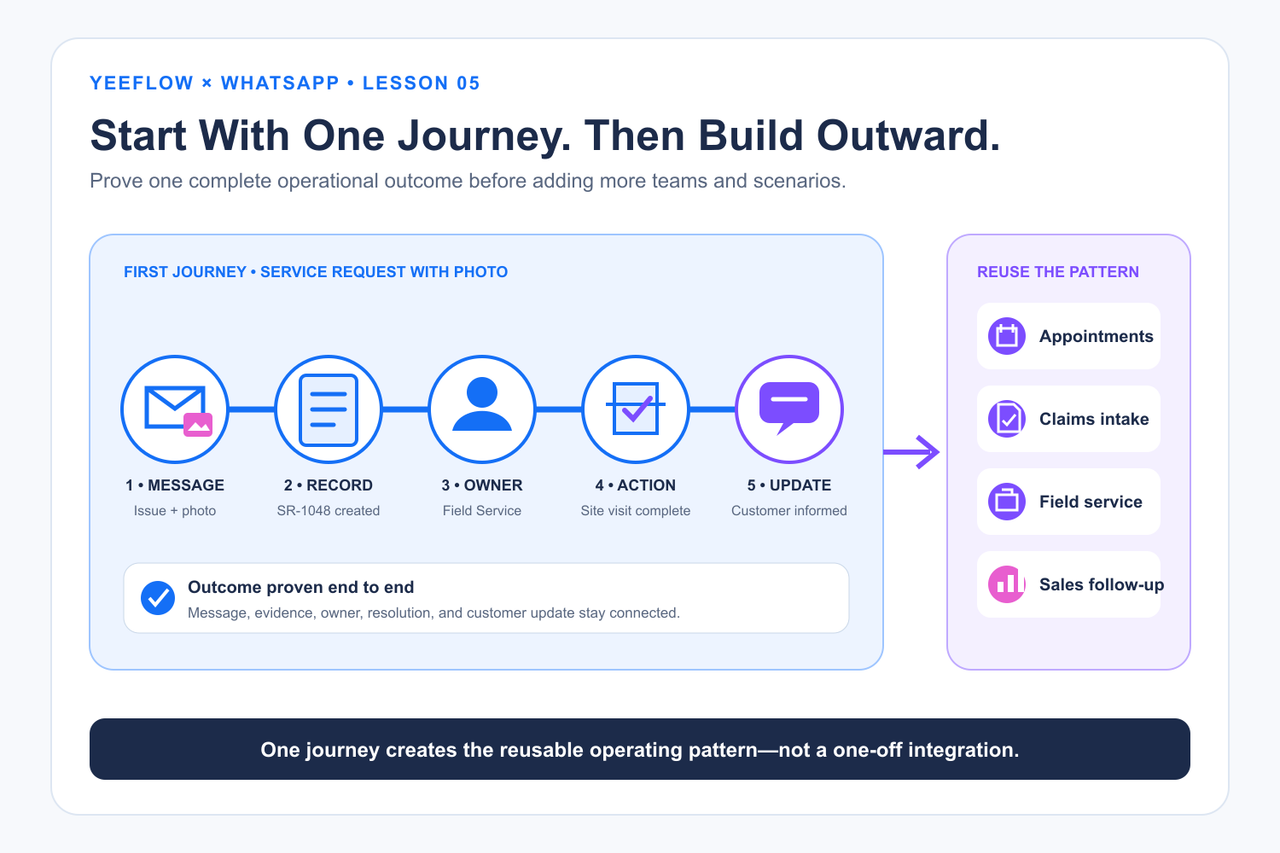
Once this path works reliably, the same foundation can support appointment coordination, claims intake, delivery enquiries, sales follow-up, field support, incident reporting, dealer operations, or partner service. The communication layer can stay stable while teams extend the Yeeflow application with the records and workflows relevant to their own journey.
This approach also makes governance manageable. Consent and opt-in rules, message templates, access permissions, retention, monitoring, exception handling, and operational ownership can be designed around a concrete use case before the solution expands.
The reference demo proved the technical round trip, but a successful demo is not production readiness. A real rollout must be tested against the organization’s Meta configuration, policies, security model, support process, data obligations, and expected volumes.
See the reference solution in action
The installable demo includes two operating experiences built on the same Customer and WhatsApp Message Data Lists. Workspace uses native Yeeflow controls. Workspace 2 uses optional Custom Code controls for an inbox-style timeline and reply composer. Both are intended to show how conversation history and business context can live together without making chat the system of record. Media remains connected to its message record and supported images can be previewed in the operational timeline.
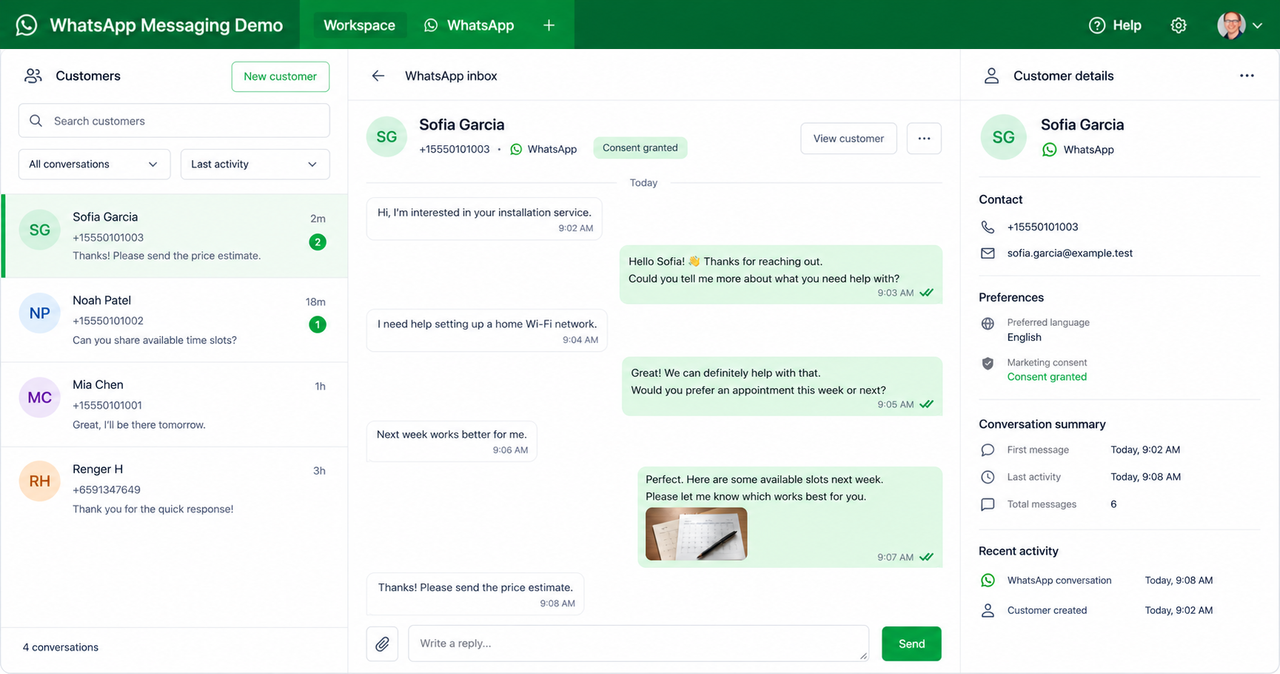
The repository also includes the Azure Functions source, a Custom Service template, the Yeeflow application package with fictional sample data, and step-by-step deployment and troubleshooting documentation.
Under the hood: how the reference architecture works
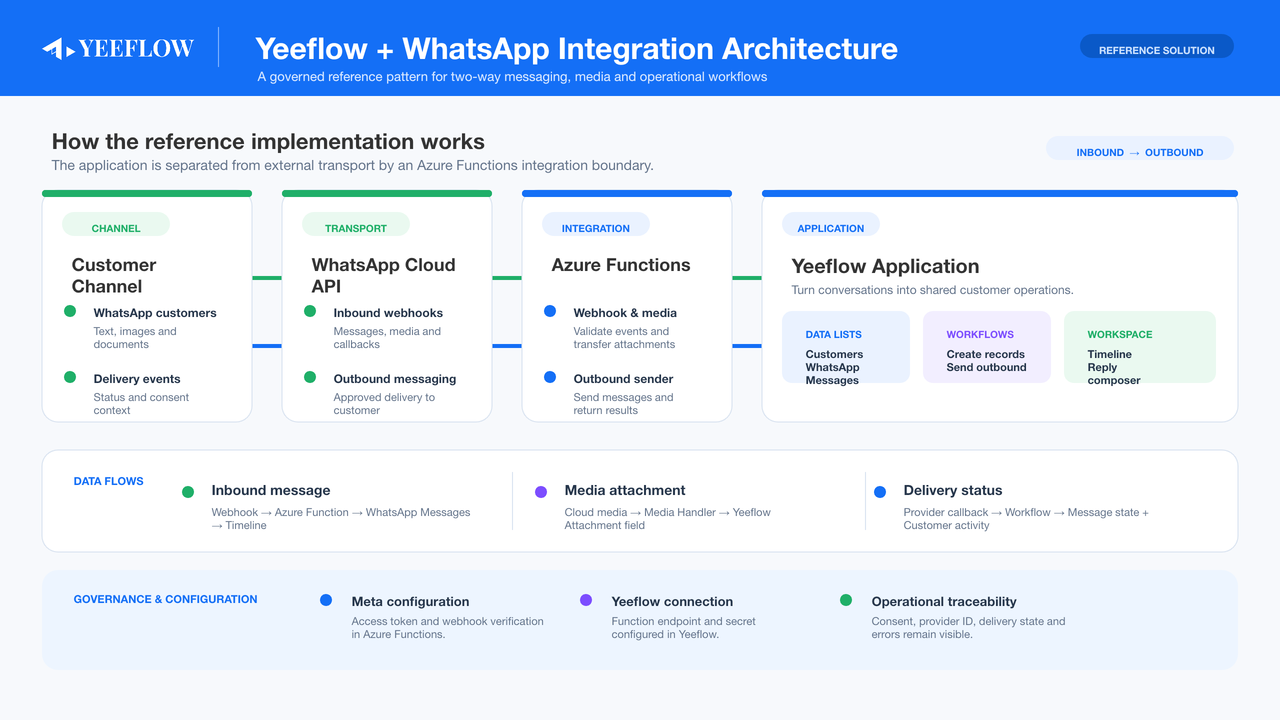
The architecture gives each component a focused responsibility:
- Meta WhatsApp Cloud API provides messaging, media access, webhook events, and delivery callbacks.
- Azure Functions validates inbound events, normalizes payloads, transfers media, protects the outbound endpoint, prevents duplicate processing, and correlates provider status updates.
- Yeeflow manages customers, messages, attachments, dashboards, workflows, permissions, and the broader business process.
For inbound traffic, Meta sends a webhook event to Azure Functions. The integration validates and deduplicates it, matches the customer, downloads media when present, and writes the operational record to Yeeflow. For outbound traffic, a Yeeflow workflow invokes an authenticated Custom Service, which calls Azure Functions and sends the message through Meta. Provider references and later delivery callbacks update the Yeeflow record.
This separation keeps provider-specific transport logic out of the business application while keeping customer and process data out of the transport layer.
From reference demo to production
The project is a reference implementation for evaluation, learning, and solution acceleration—not a production-ready WhatsApp deployment. It contains no production credentials or customer data.
Before rollout, an organization must configure its own Meta Business and WhatsApp assets, secure credentials, webhook, Yeeflow tenant and Data List identifiers, HTTP connection, Custom Service bindings, and workflow mappings. It must also define consent, templates, retention, permissions, security review, monitoring, incident handling, and support ownership. Meta interfaces and policy requirements can change, so current official documentation should always be checked during implementation.
Explore the solution
The right question is not “How do we add WhatsApp?” It is “Which customer journey should become easier, more visible, and more accountable?”
Start with one moment that matters. Connect the conversation to its owner, business record, evidence, and next action. Then expand from a working operational pattern.