Overview
What this template helps teams build
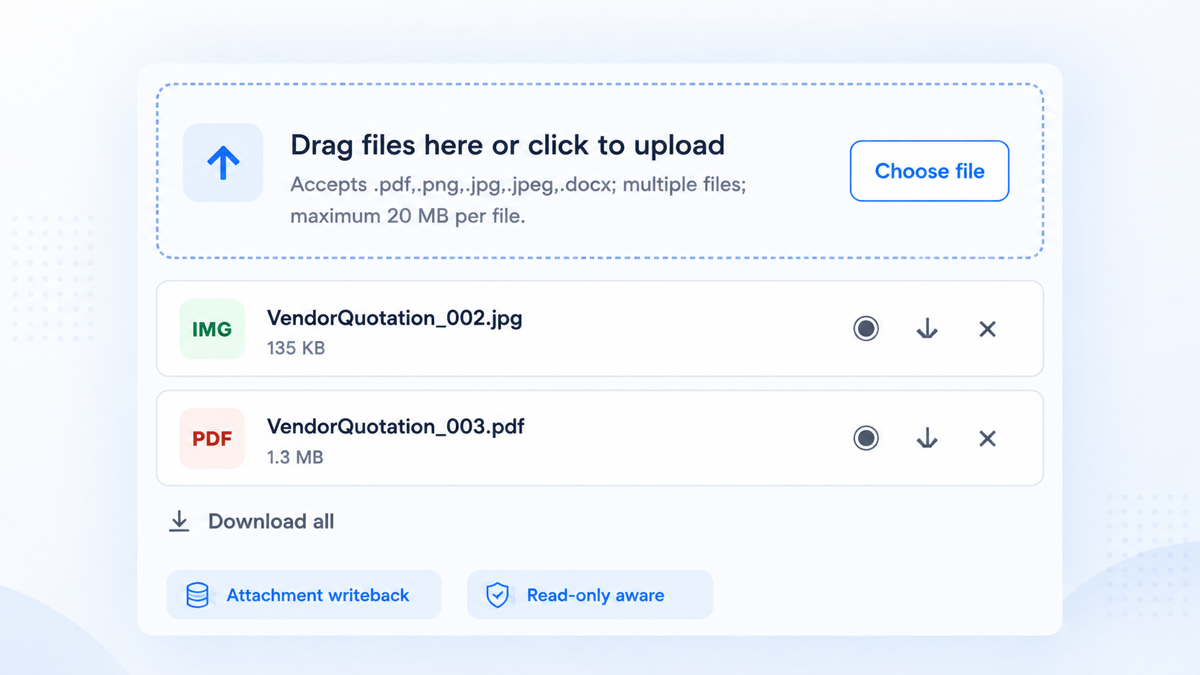
A modern, reusable upload experience for Yeeflow forms. Users can drag files into the control or select them from the system picker, while builders retain direct control over Attachment-variable persistence, accepted formats, size limits, file count, and layout density.
Key capabilities
- Drag-and-drop and click-to-select share one validation and upload flow.
- Supports single-file and multiple-file modes with responsive file cards.
- Writes normalized Attachment metadata directly to a selected writable variable through the Yeeflow form runtime.
- Provides browser-supported preview, individual download and delete actions, plus in-browser ZIP-based Download all.
- Automatically hides upload and delete operations in read-only forms while preserving available preview and download actions.
Recommended use cases
Vendor quotations, procurement evidence, invoices, contracts, HR documents, expense receipts, service-case evidence, compliance records, project deliverables, and other supporting-document collections.
Supported placement
Approval Form Custom Code control is the primary reference placement. Data List custom forms are structurally compatible but require separate writeback and save/reopen testing. Dashboard and Public Form persistence are not claimed without separate runtime validation.
How upload and writeback work
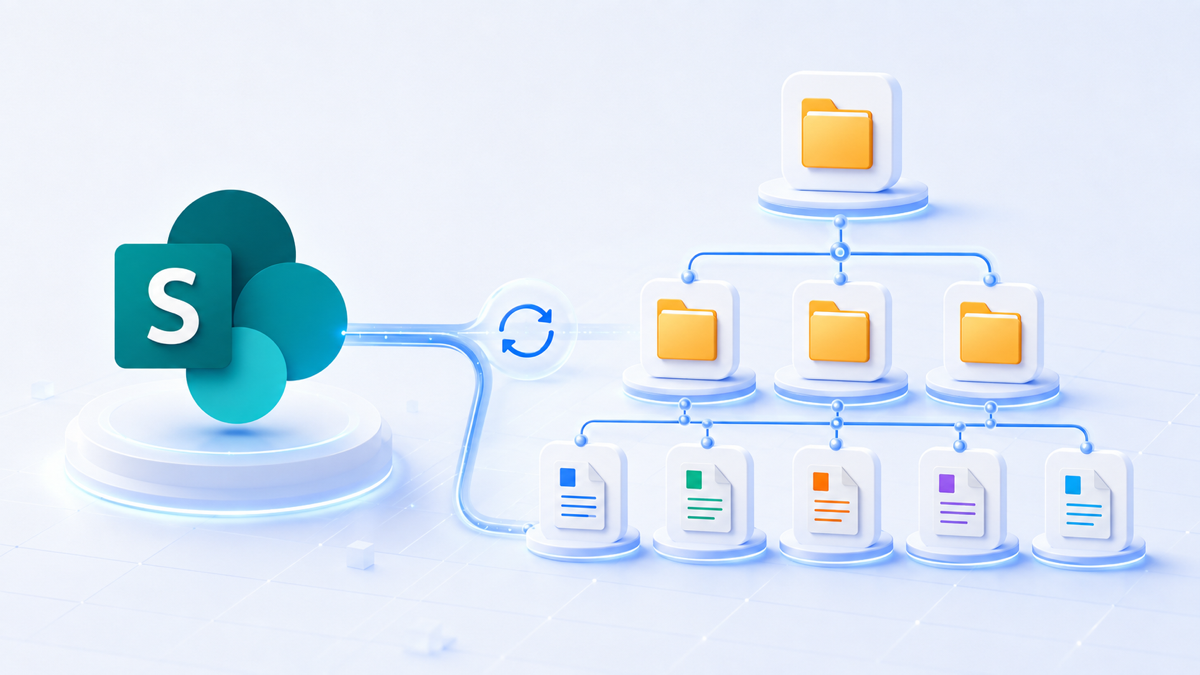
The control validates selected files in the browser, uploads each accepted file with yeeSDKClient.files.upload(...), normalizes the response to Yeeflow Attachment metadata, and writes either one Attachment object or an array to the bound variable. Preview and download retrieve protected content with yeeSDKClient.files.getContent(id). Delete updates that same bound value.
Preview, read-only and Download all
Preview is available for PDFs, common web images, text, Markdown, JSON, XML and CSV. Office files, archives and unknown formats remain download-only. Read-only forms keep file cards and retrieval actions while hiding mutations. In multiple-file mode, Download all creates an uncompressed ZIP in browser memory when at least two visible files are available.
Production readiness
The TSX source passed a compatible TypeScript compilation check. Before marking the asset launch-ready or certified, repeat Designer configuration, browser interaction, supported-placement, SDK permission, Attachment writeback, save/submit, reopen, preview/download and read-only validation in the release tenant.
Developer reference
Build patterns behind this template
Use this template as a reference while reviewing the Custom Code developer guide. Learn how the required export structure, input parameters, and rendering patterns fit together.
Source preview
Code preview
import * as React from 'react';

interface AttachmentFile {
  [key: string]: any;
}

interface UploaderProps {
  context: any;
  fieldsValues: any;
  readonly: boolean;
  rootId: string;
  targetName: string;
  currentValue: any;
  multiple: boolean;
  acceptedFileTypes: string;
  maxFileSizeMB: number;
  maxFileCount: number;
  title: string;
  helperText: string;
  displaySize: string;
  hideUploadedFiles: boolean;
}

interface UploaderState {
  attachments: AttachmentFile[];
  dragging: boolean;
  uploading: boolean;
  downloadingAll: boolean;
  progressText: string;
  errorText: string;
  activeFileId: string;
}

function valueToText(value: any): string {
  if (value === null || value === undefined) return '';
  if (typeof value === 'string' || typeof value === 'number' || typeof value === 'boolean') return String(value);
  if (Array.isArray(value)) return value.length ? valueToText(value[0]) : '';
  if (typeof value === 'object') {
    var keys = ['fieldId', 'FieldId', 'fieldName', 'FieldName', 'variableId', 'VariableId', 'variableName', 'VariableName', 'key', 'Key', 'id', 'Id', 'name', 'Name', 'label', 'Label', 'value', 'Value'];
    for (var i = 0; i < keys.length; i += 1) {
      if (value[keys[i]] !== undefined) return valueToText(value[keys[i]]);
    }
  }
  return '';
}

function valueToBoolean(value: any, fallback: boolean): boolean {
  if (typeof value === 'boolean') return value;
  if (typeof value === 'number') return value !== 0;
  var text = valueToText(value).trim().toLowerCase();
  if (!text) return fallback;
  if (text === 'true' || text === '1' || text === 'yes' || text === 'on' || text === 'multiple') return true;
  if (text === 'false' || text === '0' || text === 'no' || text === 'off' || text === 'single') return false;
  return fallback;
}

function valueToPositiveNumber(value: any, fallback: number): number {
  var parsed = Number(valueToText(value));
  return isFinite(parsed) && parsed > 0 ? parsed : fallback;
}

function normalizeDisplaySize(value: any): string {
  var size = valueToText(value).trim().toLowerCase();
  if (size === 'medium' || size === 'm') return 'medium';
  if (size === 'small' || size === 's' || size === 'compact') return 'small';
  return 'large';
}

function looksLikeTarget(value: string): boolean {
  var text = (value || '').trim();
  if (!text || text.length > 160) return false;
  if (text.charAt(0) === '[' || text.charAt(0) === '{') return false;
  if (text.indexOf('\":') >= 0 || text.indexOf('\",') >= 0) return false;
  return true;
}

function resolveConfiguredAttachmentTarget(value: any): string {
  if (value === null || value === undefined) return '';
  if (typeof value === 'string') return looksLikeTarget(value) ? value.trim() : '';
  if (Array.isArray(value)) {
    for (var a = 0; a < value.length; a += 1) {
      var arrayTarget = resolveConfiguredAttachmentTarget(value[a]);
      if (arrayTarget) return arrayTarget;
    }
    return '';
  }
  if (typeof value !== 'object') return '';
  var prefix = valueToText(value.prefix || value.Prefix).trim().toLowerCase();
  if ((prefix === '__variables_' || prefix === '__list_' || prefix === '__temp_') && typeof value.value === 'string') {
    return looksLikeTarget(value.value) ? value.value.trim() : '';
  }
  var keys = ['fieldId', 'FieldId', 'fieldName', 'FieldName', 'variableId', 'VariableId', 'variableName', 'VariableName', 'key', 'Key', 'code', 'Code'];
  for (var i = 0; i < keys.length; i += 1) {
    if (value[keys[i]] !== undefined) {
      var directTarget = resolveConfiguredAttachmentTarget(value[keys[i]]);
      if (directTarget) return directTarget;
    }
  }
  var nested = ['value', 'Value', 'target', 'binding', 'field', 'variable', 'data', 'metadata'];
  for (var n = 0; n < nested.length; n += 1) {
    if (value[nested[n]] && typeof value[nested[n]] === 'object') {
      var nestedTarget = resolveConfiguredAttachmentTarget(value[nested[n]]);
      if (nestedTarget) return nestedTarget;
    }
  }
  return '';
}

function parseAttachments(value: any): AttachmentFile[] {
  if (value === null || value === undefined || value === '') return [];
  if (Array.isArray(value)) return value.filter(function (item) { return !!item; });
  if (typeof value === 'string') {
    try {
      var parsed = JSON.parse(value);
      return parseAttachments(parsed);
    } catch (error) {
      return [];
    }
  }
  if (typeof value === 'object') {
    if (Array.isArray(value.items)) return value.items;
    if (Array.isArray(value.Data)) return value.Data;
    return [value];
  }
  return [];
}

function attachmentName(item: any): string {
  if (!item) return 'Uploaded file';
  var keys = ['fileName', 'FileName', 'name', 'Name', 'title', 'Title', 'originalName', 'OriginalName'];
  for (var i = 0; i < keys.length; i += 1) {
    if (item[keys[i]]) return String(item[keys[i]]);
  }
  return 'Uploaded file';
}

function attachmentSize(item: any): number {
  if (!item) return 0;
  var raw = item.size !== undefined ? item.size : item.Size !== undefined ? item.Size : item.fileSize !== undefined ? item.fileSize : item.FileSize;
  var size = Number(raw);
  return isFinite(size) && size > 0 ? size : 0;
}

function attachmentIdentity(item: any): string {
  if (!item) return '';
  var keys = ['id', 'ID', 'fileId', 'FileId', 'uniqueName', 'UniqueName', 'url', 'Url'];
  for (var i = 0; i < keys.length; i += 1) {
    if (item[keys[i]]) return String(item[keys[i]]);
  }
  return attachmentName(item) + ':' + attachmentSize(item);
}

function attachmentId(item: any): string {
  if (!item) return '';
  var keys = ['id', 'ID', 'fileId', 'FileId'];
  for (var i = 0; i < keys.length; i += 1) {
    if (item[keys[i]]) return String(item[keys[i]]);
  }
  return '';
}

function fileExtension(name: string): string {
  var clean = (name || '').split('?')[0].split('#')[0];
  var index = clean.lastIndexOf('.');
  return index >= 0 ? clean.slice(index + 1).toLowerCase() : '';
}

function fileTypeInfo(name: string): { label: string; color: string; background: string; mime: string } {
  var ext = fileExtension(name);
  if (ext === 'pdf') return { label: 'PDF', color: '#b42318', background: '#fef3f2', mime: 'application/pdf' };
  if (['png', 'jpg', 'jpeg', 'gif', 'webp', 'bmp', 'svg'].indexOf(ext) >= 0) return { label: 'IMG', color: '#067647', background: '#ecfdf3', mime: ext === 'svg' ? 'image/svg+xml' : 'image/' + (ext === 'jpg' ? 'jpeg' : ext) };
  if (['doc', 'docx'].indexOf(ext) >= 0) return { label: 'DOC', color: '#175cd3', background: '#eff8ff', mime: ext === 'docx' ? 'application/vnd.openxmlformats-officedocument.wordprocessingml.document' : 'application/msword' };
  if (['xls', 'xlsx', 'csv'].indexOf(ext) >= 0) return { label: 'XLS', color: '#027a48', background: '#ecfdf3', mime: ext === 'csv' ? 'text/csv' : 'application/vnd.openxmlformats-officedocument.spreadsheetml.sheet' };
  if (['ppt', 'pptx'].indexOf(ext) >= 0) return { label: 'PPT', color: '#c4320a', background: '#fff6ed', mime: 'application/vnd.openxmlformats-officedocument.presentationml.presentation' };
  if (['zip', 'rar', '7z', 'gz'].indexOf(ext) >= 0) return { label: 'ZIP', color: '#6938ef', background: '#f4f3ff', mime: 'application/zip' };
  if (['txt', 'md', 'json', 'xml'].indexOf(ext) >= 0) return { label: 'TXT', color: '#344054', background: '#f2f4f7', mime: 'text/plain' };
  return { label: ext ? ext.slice(0, 4).toUpperCase() : 'FILE', color: '#175cd3', background: '#eff8ff', mime: 'application/octet-stream' };
}

function canPreviewFile(name: string): boolean {
  var ext = fileExtension(name);
  return ['pdf', 'png', 'jpg', 'jpeg', 'gif', 'webp', 'bmp', 'svg', 'txt', 'md', 'json', 'xml', 'csv'].indexOf(ext) >= 0;
}

function formatBytes(bytes: number): string {
  if (!bytes) return '';
  if (bytes < 1024) return bytes + ' B';
  if (bytes < 1024 * 1024) return Math.round(bytes / 1024) + ' KB';
  return (bytes / (1024 * 1024)).toFixed(1) + ' MB';
}

function writeUint16(target: Uint8Array, offset: number, value: number) {
  target[offset] = value & 255;
  target[offset + 1] = (value >>> 8) & 255;
}

function writeUint32(target: Uint8Array, offset: number, value: number) {
  target[offset] = value & 255;
  target[offset + 1] = (value >>> 8) & 255;
  target[offset + 2] = (value >>> 16) & 255;
  target[offset + 3] = (value >>> 24) & 255;
}

function crc32(bytes: Uint8Array): number {
  var crc = 0xffffffff;
  for (var i = 0; i < bytes.length; i += 1) {
    crc ^= bytes[i];
    for (var bit = 0; bit < 8; bit += 1) crc = (crc >>> 1) ^ ((crc & 1) ? 0xedb88320 : 0);
  }
  return (crc ^ 0xffffffff) >>> 0;
}

function zipSafeName(name: string, index: number): string {
  var clean = (name || '').replace(/\\/g, '/').split('/').pop() || ('attachment-' + (index + 1));
  clean = clean.replace(/[\u0000-\u001f\u007f]/g, '_').trim();
  return clean || ('attachment-' + (index + 1));
}

function createStoredZip(entries: { name: string; data: Uint8Array }[]): Blob {
  var encoder = new TextEncoder();
  var localParts: Uint8Array[] = [];
  var centralParts: Uint8Array[] = [];
  var usedNames: { [key: string]: number } = {};
  var localOffset = 0;
  var now = new Date();
  var year = Math.max(1980, now.getFullYear());
  var dosTime = ((now.getHours() & 31) << 11) | ((now.getMinutes() & 63) << 5) | ((Math.floor(now.getSeconds() / 2)) & 31);
  var dosDate = (((year - 1980) & 127) << 9) | (((now.getMonth() + 1) & 15) << 5) | (now.getDate() & 31);
  for (var i = 0; i < entries.length; i += 1) {
    var baseName = zipSafeName(entries[i].name, i);
    var count = usedNames[baseName] || 0;
    usedNames[baseName] = count + 1;
    var name = baseName;
    if (count) {
      var dot = baseName.lastIndexOf('.');
      name = dot > 0 ? baseName.slice(0, dot) + ' (' + (count + 1) + ')' + baseName.slice(dot) : baseName + ' (' + (count + 1) + ')';
    }
    var nameBytes = encoder.encode(name);
    var data = entries[i].data;
    var checksum = crc32(data);
    var local = new Uint8Array(30 + nameBytes.length);
    writeUint32(local, 0, 0x04034b50);
    writeUint16(local, 4, 20);
    writeUint16(local, 6, 0x0800);
    writeUint16(local, 8, 0);
    writeUint16(local, 10, dosTime);
    writeUint16(local, 12, dosDate);
    writeUint32(local, 14, checksum);
    writeUint32(local, 18, data.length);
    writeUint32(local, 22, data.length);
    writeUint16(local, 26, nameBytes.length);
    writeUint16(local, 28, 0);
    local.set(nameBytes, 30);
    localParts.push(local, data);

    var central = new Uint8Array(46 + nameBytes.length);
    writeUint32(central, 0, 0x02014b50);
    writeUint16(central, 4, 20);
    writeUint16(central, 6, 20);
    writeUint16(central, 8, 0x0800);
    writeUint16(central, 10, 0);
    writeUint16(central, 12, dosTime);
    writeUint16(central, 14, dosDate);
    writeUint32(central, 16, checksum);
    writeUint32(central, 20, data.length);
    writeUint32(central, 24, data.length);
    writeUint16(central, 28, nameBytes.length);
    writeUint16(central, 30, 0);
    writeUint16(central, 32, 0);
    writeUint16(central, 34, 0);
    writeUint16(central, 36, 0);
    writeUint32(central, 38, 0);
    writeUint32(central, 42, localOffset);
    central.set(nameBytes, 46);
    centralParts.push(central);
    localOffset += local.length + data.length;
  }
  var centralSize = 0;
  for (var c = 0; c < centralParts.length; c += 1) centralSize += centralParts[c].length;
  var end = new Uint8Array(22);
  writeUint32(end, 0, 0x06054b50);
  writeUint16(end, 4, 0);
  writeUint16(end, 6, 0);
  writeUint16(end, 8, entries.length);
  writeUint16(end, 10, entries.length);
  writeUint32(end, 12, centralSize);
  writeUint32(end, 16, localOffset);
  writeUint16(end, 20, 0);
  var parts: BlobPart[] = [];
  for (var l = 0; l < localParts.length; l += 1) parts.push(localParts[l] as any);
  for (var p = 0; p < centralParts.length; p += 1) parts.push(centralParts[p] as any);
  parts.push(end as any);
  return new Blob(parts, { type: 'application/zip' });
}

function normalizeUploadedFile(response: any, file: File): AttachmentFile {
  var value = response;
  for (var depth = 0; depth < 4 && value && typeof value === 'object'; depth += 1) {
    if (value.Data !== undefined) value = value.Data;
    else if (value.data !== undefined) value = value.data;
    else break;
  }
  if (Array.isArray(value)) value = value.length ? value[0] : null;
  if (typeof value === 'string' || typeof value === 'number') return { id: String(value), name: file.name, fileSize: file.size };
  var result: any = value && typeof value === 'object' ? value : {};
  var id = attachmentId(result) || valueToText(result.fileID || result.FileID || result.uniqueName || result.UniqueName);
  if (!id) throw new Error('Yeeflow upload completed without returning a file ID.');
  if (!attachmentName(result) || attachmentName(result) === 'Uploaded file') result.name = file.name;
  if (!attachmentSize(result)) result.fileSize = file.size;
  if (!attachmentId(result)) result.id = id;
  return result;
}

function normalizeAcceptList(value: string): string[] {
  return (value || '').split(',').map(function (part) { return part.trim().toLowerCase(); }).filter(function (part) { return !!part; });
}

function acceptsFile(file: File, acceptedFileTypes: string): boolean {
  var rules = normalizeAcceptList(acceptedFileTypes);
  if (!rules.length || rules.indexOf('*') >= 0 || rules.indexOf('*/*') >= 0) return true;
  var name = (file.name || '').toLowerCase();
  var mime = (file.type || '').toLowerCase();
  for (var i = 0; i < rules.length; i += 1) {
    var rule = rules[i];
    if (rule.charAt(0) === '.' && name.slice(-rule.length) === rule) return true;
    if (rule.slice(-2) === '/*' && mime.indexOf(rule.slice(0, -1)) === 0) return true;
    if (mime && mime === rule) return true;
  }
  return false;
}

class DragDropAttachmentUploader extends React.Component<UploaderProps, UploaderState> {
  private fileInput: HTMLInputElement | null = null;
  private lastValueSignature: string = '';

  constructor(props: UploaderProps) {
    super(props);
    var initial = parseAttachments(props.currentValue);
    this.state = {
      attachments: initial,
      dragging: false,
      uploading: false,
      downloadingAll: false,
      progressText: '',
      errorText: '',
      activeFileId: ''
    };
    this.lastValueSignature = JSON.stringify(initial);
    this.openPicker = this.openPicker.bind(this);
    this.onInputChange = this.onInputChange.bind(this);
    this.onDragEnter = this.onDragEnter.bind(this);
    this.onDragLeave = this.onDragLeave.bind(this);
    this.onDragOver = this.onDragOver.bind(this);
    this.onDrop = this.onDrop.bind(this);
  }

  componentWillReceiveProps(nextProps: UploaderProps) {
    var next = parseAttachments(nextProps.currentValue);
    var signature = JSON.stringify(next);
    if (signature !== this.lastValueSignature && !this.state.uploading) {
      this.lastValueSignature = signature;
      this.setState({ attachments: next, progressText: next.length ? 'Attachment registered in the form.' : '' });
    } else if (signature !== this.lastValueSignature && this.state.uploading) {
      this.lastValueSignature = signature;
      this.setState({ attachments: next, uploading: false, progressText: next.length ? 'Attachment registered in the form.' : '', errorText: '' });
    }
  }

  openPicker(event?: any) {
    if (event && event.preventDefault) event.preventDefault();
    if (event && event.stopPropagation) event.stopPropagation();
    if (this.props.readonly || this.state.uploading) return;
    if (this.fileInput) this.fileInput.click();
  }

  onInputChange(event: any) {
    var files = event && event.target && event.target.files ? event.target.files : null;
    this.processFiles(files);
    if (event && event.target) event.target.value = '';
  }

  onDragEnter(event: any) {
    event.preventDefault();
    event.stopPropagation();
    if (!this.props.readonly) this.setState({ dragging: true });
  }

  onDragLeave(event: any) {
    event.preventDefault();
    event.stopPropagation();
    this.setState({ dragging: false });
  }

  onDragOver(event: any) {
    event.preventDefault();
    event.stopPropagation();
    if (event.dataTransfer) event.dataTransfer.dropEffect = this.props.readonly ? 'none' : 'copy';
  }

  onDrop(event: any) {
    event.preventDefault();
    event.stopPropagation();
    this.setState({ dragging: false });
    if (this.props.readonly || this.state.uploading) return;
    this.processFiles(event.dataTransfer && event.dataTransfer.files);
  }

  validateFiles(fileList: FileList | File[]): { files: File[]; error: string } {
    var selected: File[] = [];
    if (fileList) {
      for (var i = 0; i < (fileList as any).length; i += 1) selected.push((fileList as any)[i]);
    }
    if (!this.props.multiple && selected.length > 1) selected = [selected[0]];
    var errors: string[] = [];
    var valid: File[] = [];
    var maxBytes = this.props.maxFileSizeMB * 1024 * 1024;
    for (var n = 0; n < selected.length; n += 1) {
      var file = selected[n];
      if (!acceptsFile(file, this.props.acceptedFileTypes)) {
        errors.push(file.name + ': unsupported file type');
      } else if (file.size > maxBytes) {
        errors.push(file.name + ': exceeds ' + this.props.maxFileSizeMB + ' MB');
      } else {
        valid.push(file);
      }
    }
    var available = this.props.multiple ? Math.max(0, this.props.maxFileCount - this.state.attachments.length) : 1;
    if (valid.length > available) {
      errors.push('Only ' + available + ' more file(s) can be uploaded.');
      valid = valid.slice(0, available);
    }
    return { files: valid, error: errors.join('; ') };
  }

  writeAttachmentValue(value: any): Promise<boolean> {
    var target = this.props.targetName;
    if (!target) return Promise.resolve(false);
    try { if (this.props.fieldsValues && typeof this.props.fieldsValues === 'object') this.props.fieldsValues[target] = value; } catch (error) {}
    var context = this.props.context;
    var hosts = [context, context && context.formContext, context && context.variableContext, context && context.runtimeContext];
    var methods = ['setFieldValue', 'setFormFieldValue', 'setVariableValue', 'setVariable', 'updateFieldValue', 'changeFieldValue'];
    for (var h = 0; h < hosts.length; h += 1) {
      var host = hosts[h];
      if (!host) continue;
      for (var m = 0; m < methods.length; m += 1) {
        if (typeof host[methods[m]] === 'function') {
          try {
            return Promise.resolve(host[methods[m]](target, value)).then(function () { return true; });
          } catch (error) {
            // Try the next setter exposed by this runtime.
          }
        }
      }
    }
    return Promise.resolve(false);
  }

  uploadWithSdk(files: File[]) {
    var sdk = this.props.context && this.props.context.modules && this.props.context.modules.yeeSDKClient;
    if (!sdk || !sdk.files || typeof sdk.files.upload !== 'function') {
      this.setState({ uploading: false, progressText: '', errorText: 'Yeeflow SDK file upload is unavailable in this browser runtime.' });
      return;
    }
    var self = this;
    this.setState({ uploading: true, errorText: '', progressText: 'Uploading file to Yeeflow…' });
    var jobs = files.map(function (file) {
      return Promise.resolve(file.arrayBuffer()).then(function (buffer) {
        return sdk.files.upload({ fileName: file.name, file: buffer });
      }).then(function (response: any) { return normalizeUploadedFile(response, file); });
    });
    Promise.all(jobs).then(function (uploaded) {
      var next = self.props.multiple ? self.state.attachments.concat(uploaded) : uploaded.slice(0, 1);
      var value = self.props.multiple ? next : (next.length ? next[0] : null);
      return self.writeAttachmentValue(value).then(function (written) {
        if (!written) throw new Error('The file was uploaded, but the Attachment variable setter is unavailable.');
        self.lastValueSignature = JSON.stringify(next);
        self.setState({ attachments: next, uploading: false, progressText: 'Attachment registered in the form.', errorText: '' });
      });
    }).catch(function (error: any) {
      self.setState({ uploading: false, progressText: '', errorText: error && error.message ? error.message : String(error) });
    });
  }

  getFileBlob(item: AttachmentFile): Promise<Blob> {
    var fileId = attachmentId(item);
    var sdk = this.props.context && this.props.context.modules && this.props.context.modules.yeeSDKClient;
    if (!fileId) return Promise.reject(new Error('The attachment has no file ID.'));
    if (!sdk || !sdk.files || typeof sdk.files.getContent !== 'function') {
      return Promise.reject(new Error('Yeeflow files.getContent is unavailable in this browser runtime.'));
    }
    var mime = fileTypeInfo(attachmentName(item)).mime;
    return Promise.resolve(sdk.files.getContent(fileId)).then(function (response: any) {
      var data = response && response.data !== undefined ? response.data : response && response.Data !== undefined ? response.Data : response;
      if (data instanceof Blob) return data.type ? data : new Blob([data], { type: mime });
      if (data instanceof ArrayBuffer) return new Blob([data], { type: mime });
      if (data && data.buffer instanceof ArrayBuffer) return new Blob([data.buffer], { type: mime });
      if (typeof data === 'string') {
        var encoded = data.indexOf(',') >= 0 && data.indexOf('base64') >= 0 ? data.slice(data.indexOf(',') + 1) : data;
        var binary = atob(encoded);
        var bytes = new Uint8Array(binary.length);
        for (var i = 0; i < binary.length; i += 1) bytes[i] = binary.charCodeAt(i);
        return new Blob([bytes], { type: mime });
      }
      throw new Error('Yeeflow returned an unsupported file-content format.');
    });
  }

  previewFile(item: AttachmentFile, event?: any) {
    if (event && event.preventDefault) event.preventDefault();
    if (event && event.stopPropagation) event.stopPropagation();
    var fileId = attachmentId(item);
    var popup = typeof window !== 'undefined' ? window.open('', '_blank') : null;
    this.setState({ activeFileId: fileId, errorText: '', progressText: 'Preparing preview...' });
    var self = this;
    this.getFileBlob(item).then(function (blob) {
      var url = URL.createObjectURL(blob);
      if (popup) popup.location.href = url;
      else window.open(url, '_blank');
      setTimeout(function () { URL.revokeObjectURL(url); }, 60000);
      self.setState({ activeFileId: '', progressText: 'Preview opened.' });
    }).catch(function (error: any) {
      if (popup) popup.close();
      self.setState({ activeFileId: '', progressText: '', errorText: error && error.message ? error.message : String(error) });
    });
  }

  downloadFile(item: AttachmentFile, event?: any) {
    if (event && event.preventDefault) event.preventDefault();
    if (event && event.stopPropagation) event.stopPropagation();
    var fileId = attachmentId(item);
    var self = this;
    this.setState({ activeFileId: fileId, errorText: '', progressText: 'Preparing download...' });
    this.getFileBlob(item).then(function (blob) {
      var url = URL.createObjectURL(blob);
      var link = document.createElement('a');
      link.href = url;
      link.download = attachmentName(item);
      link.style.display = 'none';
      document.body.appendChild(link);
      link.click();
      document.body.removeChild(link);
      setTimeout(function () { URL.revokeObjectURL(url); }, 60000);
      self.setState({ activeFileId: '', progressText: 'Download started.' });
    }).catch(function (error: any) {
      self.setState({ activeFileId: '', progressText: '', errorText: error && error.message ? error.message : String(error) });
    });
  }

  downloadAll(event?: any) {
    if (event && event.preventDefault) event.preventDefault();
    if (event && event.stopPropagation) event.stopPropagation();
    if (!this.props.multiple || !this.state.attachments.length || this.state.downloadingAll) return;
    var self = this;
    this.setState({ downloadingAll: true, errorText: '', progressText: 'Preparing ZIP download…' });
    Promise.all(this.state.attachments.map(function (item) {
      return self.getFileBlob(item).then(function (blob) {
        return blob.arrayBuffer().then(function (buffer) {
          return { name: attachmentName(item), data: new Uint8Array(buffer) };
        });
      });
    })).then(function (entries) {
      var zip = createStoredZip(entries);
      var url = URL.createObjectURL(zip);
      var link = document.createElement('a');
      var stamp = new Date().toISOString().replace(/[-:]/g, '').replace(/\..+$/, '').replace('T', '-');
      link.href = url;
      link.download = 'attachments-' + stamp + '.zip';
      link.style.display = 'none';
      document.body.appendChild(link);
      link.click();
      document.body.removeChild(link);
      setTimeout(function () { URL.revokeObjectURL(url); }, 60000);
      self.setState({ downloadingAll: false, progressText: 'ZIP download started.', errorText: '' });
    }).catch(function (error: any) {
      self.setState({ downloadingAll: false, progressText: '', errorText: error && error.message ? error.message : String(error) });
    });
  }

  removeFile(item: AttachmentFile, event?: any) {
    if (event && event.preventDefault) event.preventDefault();
    if (event && event.stopPropagation) event.stopPropagation();
    if (this.props.readonly) return;
    var self = this;
    var identity = attachmentIdentity(item);
    var next = this.state.attachments.filter(function (candidate) { return attachmentIdentity(candidate) !== identity; });
    var value = this.props.multiple ? next : (next.length ? next[0] : null);
    this.setState({ activeFileId: attachmentId(item), errorText: '', progressText: 'Removing attachment from the form…' });
    this.writeAttachmentValue(value).then(function (written) {
      if (!written) throw new Error('The Attachment variable setter is unavailable.');
      self.lastValueSignature = JSON.stringify(next);
      self.setState({ attachments: next, activeFileId: '', progressText: next.length ? 'Attachment removed.' : '', errorText: '' });
    }).catch(function (error: any) {
      self.setState({ activeFileId: '', progressText: '', errorText: error && error.message ? error.message : String(error) });
    });
  }

  processFiles(fileList: FileList | File[]) {
    var checked = this.validateFiles(fileList);
    if (!checked.files.length) {
      if (checked.error) this.setState({ errorText: checked.error });
      return;
    }
    if (checked.error) this.setState({ errorText: checked.error });
    this.uploadWithSdk(checked.files);
  }

  render() {
    var self = this;
    var styles = [
      '.yf-dd-upload{font-family:inherit;color:#17233d}',
      '.yf-dd-zone{box-sizing:border-box;width:100%;min-height:152px;border:1.5px dashed #9ebce8;border-radius:10px;background:#f8fbff;padding:24px;text-align:center;cursor:pointer;transition:border-color .15s,background .15s}',
      '.yf-dd-zone:hover,.yf-dd-zone.is-dragging{border-color:#146FF6;background:#eef6ff}',
      '.yf-dd-zone.is-readonly{cursor:default;background:#f7f8fa;border-color:#d8dee8}',
      '.yf-dd-icon{display:inline-flex;width:42px;height:42px;border-radius:10px;align-items:center;justify-content:center;background:#e8f2ff;color:#146FF6;font-size:23px;font-weight:700}',
      '.yf-dd-title{margin-top:12px;font-size:15px;font-weight:600;color:#17233d}',
      '.yf-dd-helper{margin-top:5px;font-size:12px;line-height:1.5;color:#667085}',
      '.yf-dd-button{margin-top:14px;border:1px solid #146FF6;border-radius:6px;background:#fff;color:#0b63d8;padding:7px 14px;font-weight:600;cursor:pointer}',
      '.yf-dd-button[disabled]{cursor:not-allowed;opacity:.55}',
      '.yf-dd-status{margin-top:9px;font-size:12px;color:#1769aa}',
      '.yf-dd-error{margin-top:9px;border-radius:6px;background:#fff4f2;color:#b42318;padding:8px 10px;font-size:12px;text-align:left}',
      '.yf-dd-list-toolbar{display:flex;justify-content:flex-start;align-items:center;margin-top:10px}',
      '.yf-dd-download-all{display:inline-flex;align-items:center;gap:8px;border:0;border-radius:4px;background:transparent;color:#475467;padding:7px 4px;font-size:13px;font-weight:400;line-height:20px;cursor:pointer}',
      '.yf-dd-download-all:hover{background:#f2f4f7;color:#175cd3}',
      '.yf-dd-download-all-icon{display:inline-flex;align-items:center;justify-content:center;width:18px;height:18px;flex:0 0 auto}',
      '.yf-dd-download-all[disabled]{cursor:not-allowed;opacity:.5}',
      '.yf-dd-list{display:grid;grid-template-columns:repeat(auto-fill,minmax(280px,1fr));gap:10px;margin-top:10px}',
      '.yf-dd-file{display:flex;align-items:center;gap:10px;min-width:0;padding:11px 12px;border:1px solid #e2e8f0;border-radius:8px;background:#fff;transition:border-color .15s,box-shadow .15s}',
      '.yf-dd-file:hover{border-color:#b2ccff;box-shadow:0 1px 3px rgba(16,24,40,.08)}',
      '.yf-dd-file-icon{flex:0 0 auto;width:38px;height:38px;border-radius:8px;display:flex;align-items:center;justify-content:center;font-size:11px;font-weight:800;letter-spacing:.2px}',
      '.yf-dd-file-main{min-width:0;flex:1;text-align:left}',
      '.yf-dd-file-name{display:block;width:100%;overflow:hidden;text-overflow:ellipsis;white-space:nowrap;border:0;background:transparent;padding:0;text-align:left;color:#17233d;font-size:13px;font-weight:600;cursor:pointer}',
      '.yf-dd-file-name:hover{text-decoration:underline;color:#0b63d8}',
      '.yf-dd-file-name.is-static{cursor:default}',
      '.yf-dd-file-name.is-static:hover{text-decoration:none;color:#17233d}',
      '.yf-dd-file-size{margin-top:2px;font-size:11px;color:#7a8699}',
      '.yf-dd-file-actions{display:flex;flex:0 0 auto;gap:3px}',
      '.yf-dd-action{display:inline-flex;align-items:center;justify-content:center;width:30px;height:30px;border:0;border-radius:6px;background:transparent;color:#475467;cursor:pointer;font-size:15px}',
      '.yf-dd-action:hover{background:#f2f4f7;color:#175cd3}',
      '.yf-dd-action.is-delete:hover{background:#fef3f2;color:#b42318}',
      '.yf-dd-action[disabled]{cursor:not-allowed;opacity:.45}',
      '.yf-dd-upload.size-medium .yf-dd-zone{min-height:112px;padding:16px 18px}',
      '.yf-dd-upload.size-medium .yf-dd-icon{width:36px;height:36px;border-radius:8px;font-size:20px}',
      '.yf-dd-upload.size-medium .yf-dd-title{margin-top:8px;font-size:14px}',
      '.yf-dd-upload.size-medium .yf-dd-helper{margin-top:3px}',
      '.yf-dd-upload.size-medium .yf-dd-button{margin-top:10px;padding:6px 12px}',
      '.yf-dd-upload.size-small .yf-dd-zone{min-height:66px;padding:10px 12px;display:grid;grid-template-columns:34px minmax(0,1fr) auto;grid-template-rows:auto auto;column-gap:12px;row-gap:1px;align-items:center;text-align:left}',
      '.yf-dd-upload.size-small .yf-dd-icon{grid-column:1;grid-row:1 / 3;width:32px;height:32px;border-radius:8px;font-size:18px}',
      '.yf-dd-upload.size-small .yf-dd-title{grid-column:2;grid-row:1;margin:0;font-size:14px;line-height:19px;white-space:nowrap;overflow:hidden;text-overflow:ellipsis}',
      '.yf-dd-upload.size-small .yf-dd-helper-primary{grid-column:2;grid-row:2;margin:0;font-size:11px;line-height:16px;white-space:nowrap;overflow:hidden;text-overflow:ellipsis}',
      '.yf-dd-upload.size-small .yf-dd-helper-rules{display:none}',
      '.yf-dd-upload.size-small .yf-dd-button{grid-column:3;grid-row:1 / 3;margin:0;padding:6px 12px;white-space:nowrap}',
      '.yf-dd-upload.size-small .yf-dd-status{grid-column:2 / 4;margin-top:4px}',
      '@media(max-width:640px){.yf-dd-upload.size-large .yf-dd-zone{padding:18px 14px;min-height:136px}.yf-dd-list{grid-template-columns:1fr}.yf-dd-upload.size-small .yf-dd-zone{grid-template-columns:32px minmax(0,1fr)}.yf-dd-upload.size-small .yf-dd-button{grid-column:1 / 3;grid-row:auto;justify-self:start;margin-top:8px}.yf-dd-upload.size-small .yf-dd-status{grid-column:1 / 3}}'
    ].join('');
    var acceptText = this.props.acceptedFileTypes || 'all file types';
    var modeText = this.props.multiple ? 'multiple files' : 'one file';
    var showUploadZone = !this.props.readonly && (this.props.multiple ? this.state.attachments.length < this.props.maxFileCount : this.state.attachments.length === 0);
    return <div id={this.props.rootId} className={'yf-dd-upload size-' + this.props.displaySize}>
      <style>{styles}</style>
      <input
        ref={function (node: HTMLInputElement | null) { self.fileInput = node; }}
        data-yf-dd-picker="true"
        type="file"
        multiple={this.props.multiple}
        accept={this.props.acceptedFileTypes}
        onChange={this.onInputChange}
        style={{ display: 'none' }}
      />
      {showUploadZone ? <div
        className={'yf-dd-zone' + (this.state.dragging ? ' is-dragging' : '') + (this.props.readonly ? ' is-readonly' : '')}
        onClick={this.openPicker}
        onDragEnter={this.onDragEnter}
        onDragLeave={this.onDragLeave}
        onDragOver={this.onDragOver}
        onDrop={this.onDrop}
        role="button"
        tabIndex={this.props.readonly ? -1 : 0}
      >
        <div className="yf-dd-icon">↑</div>
        <div className="yf-dd-title">{this.props.title}</div>
        <div className="yf-dd-helper yf-dd-helper-primary">{this.props.helperText || ('Accepts ' + acceptText + '; ' + modeText + '; maximum ' + this.props.maxFileSizeMB + ' MB per file.')}</div>
        {!this.props.readonly ? <button className="yf-dd-button" type="button" disabled={this.state.uploading} onClick={this.openPicker}>{this.state.uploading ? 'Uploading...' : 'Choose file'}</button> : null}
        {this.state.progressText ? <div className="yf-dd-status">{this.state.progressText}</div> : null}
      </div> : null}
      {this.state.errorText ? <div className="yf-dd-error">{this.state.errorText}</div> : null}
      {!this.props.hideUploadedFiles && this.state.attachments.length ? <div className="yf-dd-list">{this.state.attachments.map(function (item, index) {
        var size = attachmentSize(item);
        var identity = attachmentIdentity(item) || String(index);
        var typeInfo = fileTypeInfo(attachmentName(item));
        var canPreview = canPreviewFile(attachmentName(item));
        var busy = self.state.downloadingAll || self.state.activeFileId === attachmentId(item);
        return <div className="yf-dd-file" key={attachmentIdentity(item) || String(index)}>
          <div className="yf-dd-file-icon" style={{ color: typeInfo.color, background: typeInfo.background }}>{typeInfo.label}</div>
          <div className="yf-dd-file-main">{canPreview ? <button type="button" className="yf-dd-file-name" title={'Preview ' + attachmentName(item)} disabled={busy} onClick={function (event: any) { self.previewFile(item, event); }}>{attachmentName(item)}</button> : <span className="yf-dd-file-name is-static" title={attachmentName(item)}>{attachmentName(item)}</span>}{size ? <div className="yf-dd-file-size">{formatBytes(size)}</div> : null}</div>
          <div className="yf-dd-file-actions">
            {canPreview ? <button type="button" className="yf-dd-action" title="Preview" aria-label={'Preview ' + identity} disabled={busy} onClick={function (event: any) { self.previewFile(item, event); }}>◉</button> : null}
            <button type="button" className="yf-dd-action" title="Download" aria-label={'Download ' + identity} disabled={busy} onClick={function (event: any) { self.downloadFile(item, event); }}>↓</button>
            {!self.props.readonly ? <button type="button" className="yf-dd-action is-delete" title="Delete" aria-label={'Delete ' + identity} disabled={busy} onClick={function (event: any) { self.removeFile(item, event); }}>×</button> : null}
          </div>
        </div>;
      })}</div> : null}
      {!this.props.hideUploadedFiles && this.props.multiple && this.state.attachments.length > 1 ? <div className="yf-dd-list-toolbar"><button type="button" className="yf-dd-download-all" disabled={this.state.downloadingAll || !!this.state.activeFileId} onClick={function (event: any) { self.downloadAll(event); }}><span className="yf-dd-download-all-icon" aria-hidden="true"><svg width="16" height="16" viewBox="0 0 16 16" fill="none"><path d="M8 2.25v7.25m0 0 2.75-2.75M8 9.5 5.25 6.75M3 12.75h10" stroke="currentColor" strokeWidth="1.4" strokeLinecap="round" strokeLinejoin="round" /></svg></span><span>{this.state.downloadingAll ? 'Preparing ZIP…' : 'Download all'}</span></button></div> : null}
    </div>;
  }
}

export class CodeInApplication implements CodeInComp {
  private attachmentTargetName: string = '';

  description() {
    return 'SDK-based drag-and-drop Attachment uploader with single/multiple mode, direct variable writeback, file actions, and multi-file ZIP download.';
  }

  inputParameters() {
    return [
      { id: 'attachmentTarget', name: 'Attachment target', type: 'variable', desc: 'Required writable Attachment form variable.' },
      { id: 'multiple', name: 'Allow multiple files', type: 'variable', desc: 'true for multiple files; false for one file.' },
      { id: 'acceptedFileTypes', name: 'Accepted file types', type: 'string', desc: 'Comma-separated extensions or MIME types, for example .pdf,.docx,image/*.' },
      { id: 'maxFileSizeMB', name: 'Maximum file size (MB)', type: 'string', desc: 'Client-side maximum size per file. Default 20.' },
      { id: 'maxFileCount', name: 'Maximum file count', type: 'string', desc: 'Maximum files when multiple mode is enabled. Default 10.' },
      { id: 'title', name: 'Upload title', type: 'string', desc: 'Main text displayed in the drop zone.' },
      { id: 'helperText', name: 'Helper text', type: 'string', desc: 'Supporting instructions displayed below the title.' },
      { id: 'displaySize', name: 'Display size', type: 'string', desc: 'Large, Medium or Small. Default Large.' },
      { id: 'hideUploadedFiles', name: 'Hide uploaded files', type: 'variable', desc: 'true hides the uploaded-file list rendered by this Custom Code control. Default false.' }
    ];
  }

  requiredFields(params: any) {
    var target = resolveConfiguredAttachmentTarget(params && params.attachmentTarget);
    if (target) this.attachmentTargetName = target;
    return target ? [target] : [];
  }

  render(context: any, fieldsValues: any, readonly: boolean) {
    var params = context && context.params ? context.params : {};
    var targetName = this.attachmentTargetName || resolveConfiguredAttachmentTarget(params.attachmentTarget);
    var currentValue = fieldsValues && fieldsValues[targetName] !== undefined ? fieldsValues[targetName] : params.attachmentTarget;
    return <DragDropAttachmentUploader
      context={context}
      fieldsValues={fieldsValues}
      readonly={!!readonly}
      rootId={'yf-dd-upload-' + (targetName || 'unbound')}
      targetName={targetName}
      currentValue={currentValue}
      multiple={valueToBoolean(params.multiple, false)}
      acceptedFileTypes={valueToText(params.acceptedFileTypes)}
      maxFileSizeMB={valueToPositiveNumber(params.maxFileSizeMB, 20)}
      maxFileCount={valueToPositiveNumber(params.maxFileCount, 10)}
      title={valueToText(params.title) || 'Drag files here or click to upload'}
      helperText={valueToText(params.helperText)}
      displaySize={normalizeDisplaySize(params.displaySize)}
      hideUploadedFiles={valueToBoolean(params.hideUploadedFiles, false)}
    />;
  }
}
Implementation notes
User guide
Drag & Drop Attachment Uploader
Purpose
This Yeeflow Custom Code control adds a drag-and-drop upload area while retaining click-to-select behavior. It supports configurable single-file and multiple-file modes and writes uploaded Attachment metadata to a bound Attachment form variable.
Supported placement
- Approval Form Custom Code control (
codein) - Data List custom form is structurally compatible, but its writeback must be runtime-tested separately.
- Dashboard and public-form persistence are not claimed.
Parameters
| Parameter | Type | Required | Purpose |
|---|---|---|---|
attachmentTarget | Variable | Yes | Select the writable Attachment variable. The control captures its configured variable ID and reads/writes its current value. |
multiple | Variable | No | true enables multiple files; default is single-file. |
acceptedFileTypes | String | No | Extensions/MIME types such as .pdf,.docx,image/*. Empty means all. |
maxFileSizeMB | String | No | Maximum size per file; default 20. |
maxFileCount | String | No | Maximum number of files; default 10. |
title | String | No | Drop-zone title. |
helperText | String | No | Drop-zone supporting text. When provided, it replaces the automatically generated file-rule summary; when empty, the control shows that summary as the fallback. |
displaySize | String | No | Upload-area density: Large, Medium, or Small. Default Large. Values are case-insensitive. |
hideUploadedFiles | Variable | No | true hides the uploaded-file list rendered by this Custom Code control. Default false, so the list is shown. |
Upload strategy and persistence boundary
- The Custom Code control handles click/drop selection and client-side validation.
- It uploads each selected file through
yeeSDKClient.files.upload({ fileName, file: arrayBuffer }). - It normalizes the SDK response to Yeeflow Attachment metadata and writes that value directly to the configured Attachment variable through the form/variable setter exposed by the runtime.
- Single-file mode writes one Attachment object. Multiple-file mode writes an array and appends later uploads until
maxFileCountis reached. - Delete updates the same bound variable directly. It does not search for or click a native Attachment menu.
- The control neither searches for nor changes any native Attachment control. Native-control visibility remains entirely under the form designer's configuration.
For the verified single-file case, the native control persists an object such as {"id":"<uuid>","name":"VendorQuotation_001.jpg","fileSize":152580}. The control deliberately does not manufacture this payload or wrap it in an array.
Approval Form setup
- Create or reuse an Attachment variable, for example
VendorQuotation. - Add a Custom Code control and paste
drag-drop-attachment-uploader.tsx. - Bind
attachmentTargettoWorkflow Variables:VendorQuotation. - Set
multipletofalsefor one quotation ortruefor supporting-document batches. - Configure
acceptedFileTypes, for example.pdf,.png,.jpg,.jpeg. - Configure
maxFileSizeMBandmaxFileCountaccording to the tenant policy. - Set
displaySizetoLarge,Medium, orSmall. Leave it empty for the defaultLargelayout. - Set
hideUploadedFiles=false(the default) to show the Custom Code file-card list, including Preview, Download and Delete. - Set
hideUploadedFiles=trueonly when the Custom Code file-card list should be hidden. This setting does not change any native Attachment control.
Behavior
- Dragging and dropping files and clicking Choose file use the same validation/upload flow.
Largeprovides the full centered drop zone and all guidance text;Mediumreduces height, padding, icon size, and spacing while retaining the same information;Smalluses a compact horizontal layout and hides the secondary accepted-file rules line to fit field-dense forms.- Display size changes presentation only. Validation, SDK upload, variable writeback, file cards, Preview, Download, Delete, and Download all behavior remain unchanged.
- In single-file mode, the upload/drop zone is shown only while the Attachment variable is empty. After one file is registered it is hidden; deleting that file and clearing the variable makes the zone reappear automatically.
- In multiple-file mode, the upload/drop zone remains visible until
maxFileCountis reached and reappears when the count falls below the limit. - Multiple-file mode appends uploaded files up to
maxFileCountand removes duplicates by file identifier or name/size fallback. - File cards use responsive CSS grid layout, allowing multiple files on one row when space permits.
- When
hideUploadedFiles=false(default), the Custom Code file-card list is shown with Preview, Download and Delete actions. - When
hideUploadedFiles=true, the Custom Code file-card list is hidden. Upload and Attachment-variable persistence continue to work. - In multiple-file mode, an Outlook-style Download all text action appears below the visible file list only when at least two files have been uploaded. It retrieves all listed files through
yeeSDKClient.files.getContent, creates an uncompressed ZIP in the browser, and downloads it asattachments-<timestamp>.zip. - Download all is not shown for zero or one file, in single-file mode, or when
hideUploadedFiles=true. - File badges distinguish PDF, image, Word, Excel/CSV, PowerPoint, archive, text and generic file types.
- Preview is shown only for browser-supported formats: PDF; PNG, JPG/JPEG, GIF, WebP, BMP and SVG images; TXT, Markdown, JSON and XML text; and CSV. For these formats, clicking the filename or Preview fetches content by attachment ID through
yeeSDKClient.files.getContentand opens a blob preview. Office files, archives and unknown formats show Download only. - Download fetches the same protected content and saves it under the attachment name.
- Delete removes the selected attachment from the bound variable directly. In single-file mode it writes
null; in multiple-file mode it writes the remaining array. - Read-only task forms completely hide the upload/drop zone, continue to display uploaded files, and keep preview/download functions available. Remove operations remain hidden.
- File names are rendered as React text, not raw HTML.
Test checklist
- Open a new Approval Form and confirm the drop zone renders.
- Test
Large,Medium, andSmallon desktop and narrow widths; confirm only layout density changes. - Bind
attachmentTargetand verify the configured variable is included inrequiredFields()even when its current value is empty. - Test click upload with one small PDF.
- Test drag upload with one small PDF.
- Confirm the Attachment variable changes immediately and survives form save/reopen.
- Enable multiple mode and test two files in one drop.
- Confirm single mode keeps only one file.
- Test extension, size and maximum-count rejections.
- Test removing one attachment and saving the form.
- Test Preview and Download for at least one JPG and one PDF.
- In multiple-file mode, select Download all, open the resulting ZIP, and verify every file name and file content.
- Test with no native Attachment controls on the page and confirm both uploaders still persist independently.
- Test both
hideUploadedFiles=falseandtrue; confirm only the Custom Code file-card list changes. - Open a read-only/task page and confirm the upload/drop zone and remove actions are hidden while preview/download remain available.
- Confirm the browser network log shows one SDK upload request per selected file and no duplicate upload.
Troubleshooting
- SDK upload unavailable: confirm the Custom Code runtime exposes
context.modules.yeeSDKClient.files.upload. - Upload succeeds but variable remains empty: verify
attachmentTargetis bound to the intended Attachment variable through the variable picker rather than supplied as a display label or current value. - Click works but drop does not: confirm the browser supports
DataTransferand that no parent control interceptsdropevents. - File appears but does not survive save: confirm the runtime exposes a supported form/variable setter and that the status says
Attachment registered in the form.. - Delete does not persist: verify the configured variable ID is exact and that the form runtime exposes a writable setter for Approval Form variables.
- Download all fails: verify every attachment has a valid file ID and the runtime exposes
yeeSDKClient.files.getContent. ZIP creation occurs in browser memory, so the total selected-file size must remain practical for the user's device.
Configuration
Example configuration
Drag & Drop Attachment Uploader Example Configuration
Single-file quotation upload
| Parameter | Example value |
|---|---|
attachmentTarget | Workflow variable VendorQuotation |
multiple | false |
acceptedFileTypes | .pdf,.png,.jpg,.jpeg |
maxFileSizeMB | 20 |
maxFileCount | 1 |
title | Upload vendor quotation |
helperText | PDF, PNG or JPG up to 20 MB. |
displaySize | Large |
hideUploadedFiles | false |
Multiple supporting-document upload
| Parameter | Example value |
|---|---|
attachmentTarget | Workflow variable SupportingDocuments |
multiple | true |
acceptedFileTypes | .pdf,.doc,.docx,.xls,.xlsx,.png,.jpg,.jpeg |
maxFileSizeMB | 20 |
maxFileCount | 10 |
title | Add supporting documents |
helperText | Drag files here or browse from your device. |
displaySize | Medium |
hideUploadedFiles | false |
Compact layout
| Parameter | Example value |
|---|---|
attachmentTarget | Attachment variable selected in the form |
multiple | true |
acceptedFileTypes | Empty (accept all at the client-side control level) |
maxFileSizeMB | 10 |
maxFileCount | 5 |
title | Add files |
helperText | Empty (show automatic rules summary) |
displaySize | Small |
hideUploadedFiles | true |
Adjust variable names and limits to match the target Yeeflow application and tenant policy. Always verify upload, save/submit, reopen, preview/download, delete, and read-only behavior before production publication.