Overview
What this template helps teams build
Display a SharePoint document library inside Yeeflow as a clean, expandable file browser. Builders select a managed Microsoft Graph / SharePoint Connection, configure the target site and library, and optionally choose a folder path as the starting location.
Actual runtime interface
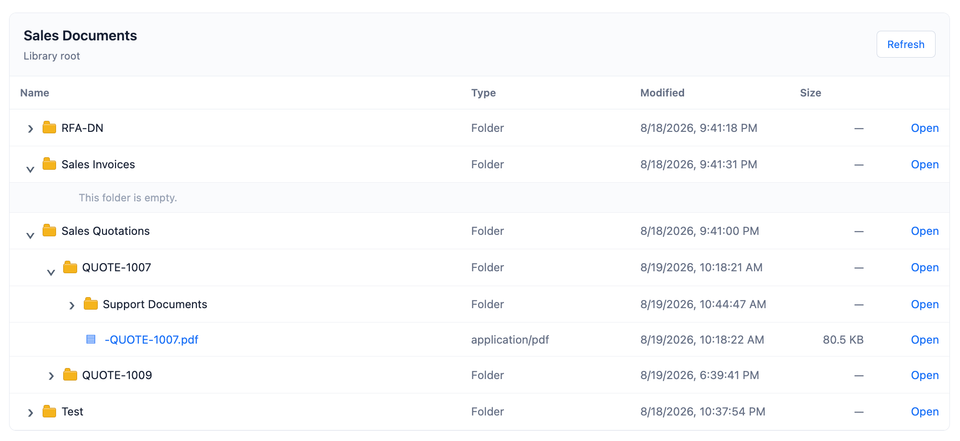
The screenshot below shows the control connected to a SharePoint document library, with expandable folder levels, file metadata, empty-folder feedback, refresh, and Open actions in the real Yeeflow runtime.
Key capabilities
- Shows the document-library root or the direct children of a configured folder path.
- Expands nested folders on demand and caches loaded children until a full refresh.
- Follows Microsoft Graph pagination links so each opened folder can return its complete listing.
- Sorts folders before files and displays name, type, modified time, file size, and SharePoint Open links.
- Includes loading, empty, folder-empty, error, refresh, and responsive narrow-screen states.
Recommended use cases
Project documents, sales quotations, procurement evidence, customer files, policies, contracts, service documents, and departmental knowledge libraries that should remain governed in SharePoint.
Connection and parameters
Bind the required sharePointConnection slot to a Microsoft Graph / SharePoint OAuth HTTP Connection. Configure siteUrl and libraryNameOrId, optionally set folderPath relative to the library root, and use title to replace the default heading.
How retrieval works
The control validates the HTTPS site URL, resolves the site through Microsoft Graph, enumerates the site's drives to match the document library by name or ID, and requests either root children, a configured path's children, or an expanded folder's children. Each folder is fetched independently and all @odata.nextLink pages are collected before rendering.
Read-only behavior
This template does not upload, download, rename, delete, move, select, or write back items. File names and Open actions navigate to the webUrl returned by Microsoft Graph in a new tab. SharePoint permissions continue to govern access.
Security and governance
Use a least-privilege managed Connection and restrict who may configure dynamic site, library, or folder expressions. Never store tokens in Custom Code parameters. Review Graph consent, tenant access, error-message exposure, pagination load, and external-sharing policy before broad rollout.
Production readiness
The source passed a compatible TypeScript compilation check after correcting the Refresh click binding. Before marking the template launchable or certified, validate Connection selection, Graph permissions, site and drive resolution, folder paths, pagination, nested expansion, Open links, responsive layout, error handling, and refresh behavior in the release tenant.
Developer reference
Build patterns behind this template
Use this template as a reference while reviewing the Custom Code developer guide. Learn how the required export structure, input parameters, and rendering patterns fit together.
Source preview
Code preview
import * as React from 'react';

type BrowserProps = {
  context: any;
  connection: any;
  siteUrl: string;
  libraryNameOrId: string;
  folderPath: string;
  title: string;
};

type BrowserState = {
  rootItems: any[];
  childrenById: { [key: string]: any[] };
  expanded: { [key: string]: boolean };
  loadingFolders: { [key: string]: boolean };
  loading: boolean;
  error: string;
  driveId: string;
  resolvedPath: string;
};

function valueToText(value: any): string {
  if (value === null || value === undefined) return '';
  if (typeof value === 'string' || typeof value === 'number' || typeof value === 'boolean') {
    return String(value).trim();
  }
  if (Array.isArray(value)) return value.length ? valueToText(value[0]) : '';
  if (typeof value === 'object') {
    var keys = ['value', 'Value', 'text', 'Text', 'name', 'Name', 'label', 'Label'];
    for (var i = 0; i < keys.length; i += 1) {
      if (value[keys[i]] !== undefined) {
        var nested = valueToText(value[keys[i]]);
        if (nested) return nested;
      }
    }
  }
  return '';
}

function normalizePath(value: any): string {
  var raw = valueToText(value).replace(/\\/g, '/');
  var parts = raw.split('/').map(function (part) { return part.trim(); }).filter(Boolean);
  for (var i = 0; i < parts.length; i += 1) {
    if (parts[i] === '.' || parts[i] === '..') throw new Error('Folder path cannot contain . or .. segments.');
  }
  return parts.join('/');
}

function encodePath(path: string): string {
  if (!path) return '';
  return path.split('/').map(function (part) { return encodeURIComponent(part); }).join('/');
}

function safeError(error: any): string {
  var message = error && error.message ? error.message : String(error || 'Unknown error');
  return message.slice(0, 500);
}

function formatSize(value: any): string {
  var size = Number(value || 0);
  if (!isFinite(size) || size <= 0) return '—';
  var units = ['B', 'KB', 'MB', 'GB', 'TB'];
  var index = 0;
  while (size >= 1024 && index < units.length - 1) {
    size = size / 1024;
    index += 1;
  }
  return (index === 0 ? String(Math.round(size)) : size.toFixed(size >= 10 ? 1 : 2)) + ' ' + units[index];
}

function formatDate(value: any): string {
  if (!value) return '—';
  var date = new Date(value);
  if (isNaN(date.getTime())) return '—';
  return date.toLocaleString();
}

function sortItems(items: any[]): any[] {
  return (items || []).slice().sort(function (left, right) {
    var leftFolder = left && left.folder ? 0 : 1;
    var rightFolder = right && right.folder ? 0 : 1;
    if (leftFolder !== rightFolder) return leftFolder - rightFolder;
    return String(left.name || '').localeCompare(String(right.name || ''), undefined, { sensitivity: 'base' });
  });
}

class SharePointDocumentBrowser extends React.Component<BrowserProps, BrowserState> {
  constructor(props: BrowserProps) {
    super(props);
    this.state = {
      rootItems: [],
      childrenById: {},
      expanded: {},
      loadingFolders: {},
      loading: false,
      error: '',
      driveId: '',
      resolvedPath: ''
    };
    this.reload = this.reload.bind(this);
  }

  componentDidMount() {
    this.reload();
  }

  componentWillReceiveProps(nextProps: BrowserProps) {
    var currentKey = [this.props.siteUrl, this.props.libraryNameOrId, this.props.folderPath, this.props.connection].join('|');
    var nextKey = [nextProps.siteUrl, nextProps.libraryNameOrId, nextProps.folderPath, nextProps.connection].join('|');
    if (currentKey !== nextKey) {
      this.setState({ rootItems: [], childrenById: {}, expanded: {}, driveId: '', error: '' }, function () {
        this.reload(nextProps);
      });
    }
  }

  graphFetch(url: string, props?: BrowserProps): Promise<any> {
    var activeProps = props || this.props;
    var modules = activeProps.context && activeProps.context.modules;
    if (!modules || typeof modules.fetch !== 'function') {
      return Promise.reject(new Error('The Yeeflow runtime did not provide context.modules.fetch.'));
    }
    if (!activeProps.connection) {
      return Promise.reject(new Error('Select a Microsoft Graph Connection for this Custom Code control.'));
    }
    var headers: any = { Accept: 'application/json' };
    var candidate: any = activeProps.connection || {};
    if (candidate.Authorization) headers.Authorization = candidate.Authorization;
    else if (candidate.authorization) headers.Authorization = candidate.authorization;
    else if (candidate.accessToken) headers.Authorization = 'Bearer ' + candidate.accessToken;
    else if (candidate.access_token) headers.Authorization = 'Bearer ' + candidate.access_token;
    else if (candidate.token) headers.Authorization = 'Bearer ' + candidate.token;
    else if (candidate.headers && (candidate.headers.Authorization || candidate.headers.authorization)) {
      headers.Authorization = candidate.headers.Authorization || candidate.headers.authorization;
    }
    return modules.fetch(url, {
      method: 'GET',
      headers: headers,
      connection: activeProps.connection
    }).then(function (response: any) {
      return response.json().catch(function () { return null; }).then(function (data: any) {
        if (!response.ok) {
          var graphMessage = data && data.error && data.error.message ? data.error.message : 'HTTP ' + response.status;
          throw new Error('Microsoft Graph request failed: ' + graphMessage);
        }
        return data || {};
      });
    });
  }

  graphCollection(url: string, props?: BrowserProps): Promise<any[]> {
    var self = this;
    var rows: any[] = [];
    function next(pageUrl: string): Promise<any[]> {
      return self.graphFetch(pageUrl, props).then(function (data: any) {
        rows = rows.concat(Array.isArray(data.value) ? data.value : []);
        var nextLink = data['@odata.nextLink'];
        return nextLink ? next(nextLink) : rows;
      });
    }
    return next(url);
  }

  parseSite(siteUrl: string): { hostname: string; sitePath: string } {
    var parser = document.createElement('a');
    parser.href = siteUrl;
    if (parser.protocol !== 'https:' || !parser.hostname) throw new Error('Site URL must be a valid HTTPS SharePoint site URL.');
    var path = parser.pathname || '/';
    path = path === '/' ? '/' : path.replace(/\/+$/, '');
    return { hostname: parser.hostname, sitePath: path };
  }

  resolveDrive(props: BrowserProps): Promise<string> {
    var self = this;
    var site = this.parseSite(props.siteUrl);
    var siteEndpoint = 'https://graph.microsoft.com/v1.0/sites/' + site.hostname + ':' + site.sitePath;
    return this.graphFetch(siteEndpoint + '?$select=id,webUrl', props).then(function (siteData: any) {
      if (!siteData.id) throw new Error('Microsoft Graph did not return the SharePoint site ID.');
      var requested = props.libraryNameOrId.toLowerCase();
      return self.graphCollection('https://graph.microsoft.com/v1.0/sites/' + encodeURIComponent(siteData.id) + '/drives?$select=id,name,webUrl,driveType', props)
        .then(function (drives: any[]) {
          var drive = drives.filter(function (item: any) {
            return String(item.id || '').toLowerCase() === requested || String(item.name || '').toLowerCase() === requested;
          })[0];
          if (!drive || !drive.id) throw new Error('Document library was not found by name or ID.');
          return String(drive.id);
        });
    });
  }

  loadChildren(driveId: string, folderId?: string, path?: string, props?: BrowserProps): Promise<any[]> {
    var select = '?$select=id,name,folder,file,webUrl,size,lastModifiedDateTime,parentReference';
    var endpoint: string;
    if (folderId) {
      endpoint = 'https://graph.microsoft.com/v1.0/drives/' + encodeURIComponent(driveId) + '/items/' + encodeURIComponent(folderId) + '/children' + select;
    } else if (path) {
      endpoint = 'https://graph.microsoft.com/v1.0/drives/' + encodeURIComponent(driveId) + '/root:/' + encodePath(path) + ':/children' + select;
    } else {
      endpoint = 'https://graph.microsoft.com/v1.0/drives/' + encodeURIComponent(driveId) + '/root/children' + select;
    }
    return this.graphCollection(endpoint, props).then(sortItems);
  }

  reload(overrideProps?: BrowserProps) {
    var self = this;
    var props = overrideProps || this.props;
    if (!props.siteUrl || !props.libraryNameOrId) {
      this.setState({ loading: false, error: 'Configure Site URL and Document Library Name or ID.', rootItems: [] });
      return;
    }
    var path = '';
    try {
      path = normalizePath(props.folderPath);
    } catch (error) {
      this.setState({ loading: false, error: safeError(error), rootItems: [] });
      return;
    }
    this.setState({ loading: true, error: '', rootItems: [], childrenById: {}, expanded: {}, resolvedPath: path });
    this.resolveDrive(props)
      .then(function (driveId: string) {
        return self.loadChildren(driveId, '', path, props).then(function (items: any[]) {
          self.setState({ driveId: driveId, rootItems: items, loading: false });
        });
      })
      .catch(function (error: any) {
        self.setState({ loading: false, error: safeError(error), driveId: '', rootItems: [] });
      });
  }

  toggleFolder(item: any) {
    var self = this;
    var id = String(item.id || '');
    if (!id || !item.folder) return;
    if (this.state.expanded[id]) {
      var collapsed = Object.assign({}, this.state.expanded);
      collapsed[id] = false;
      this.setState({ expanded: collapsed });
      return;
    }
    var expanded = Object.assign({}, this.state.expanded);
    expanded[id] = true;
    if (this.state.childrenById[id]) {
      this.setState({ expanded: expanded });
      return;
    }
    var loadingFolders = Object.assign({}, this.state.loadingFolders);
    loadingFolders[id] = true;
    this.setState({ expanded: expanded, loadingFolders: loadingFolders });
    this.loadChildren(this.state.driveId, id)
      .then(function (items: any[]) {
        var childrenById = Object.assign({}, self.state.childrenById);
        var nextLoading = Object.assign({}, self.state.loadingFolders);
        childrenById[id] = items;
        nextLoading[id] = false;
        self.setState({ childrenById: childrenById, loadingFolders: nextLoading });
      })
      .catch(function (error: any) {
        var nextExpanded = Object.assign({}, self.state.expanded);
        var nextLoading = Object.assign({}, self.state.loadingFolders);
        nextExpanded[id] = false;
        nextLoading[id] = false;
        self.setState({ expanded: nextExpanded, loadingFolders: nextLoading, error: safeError(error) });
      });
  }

  renderRows(items: any[], depth: number): any[] {
    var self = this;
    var rows: any[] = [];
    (items || []).forEach(function (item: any) {
      var id = String(item.id || item.name || Math.random());
      var isFolder = !!item.folder;
      var isExpanded = !!self.state.expanded[id];
      var isLoading = !!self.state.loadingFolders[id];
      rows.push(
        <tr key={id} className="spdb-row">
          <td className="spdb-name-cell">
            <div className="spdb-name-wrap" style={{ paddingLeft: (depth * 24) + 'px' }}>
              {isFolder ? (
                <button type="button" className="spdb-chevron" aria-label={isExpanded ? 'Collapse folder' : 'Expand folder'} onClick={function () { self.toggleFolder(item); }}>
                  {isLoading ? '…' : (isExpanded ? '⌄' : '›')}
                </button>
              ) : <span className="spdb-chevron-spacer" />}
              {isFolder ? <span className="spdb-icon spdb-folder-icon" aria-hidden="true" /> : <span className="spdb-icon spdb-file">▤</span>}
              {isFolder ? (
                <button type="button" className="spdb-name-button" onClick={function () { self.toggleFolder(item); }}>{item.name || 'Unnamed folder'}</button>
              ) : (
                <a className="spdb-file-link" href={item.webUrl || '#'} target="_blank" rel="noopener noreferrer">{item.name || 'Unnamed file'}</a>
              )}
            </div>
          </td>
          <td className="spdb-type-cell">{isFolder ? 'Folder' : ((item.file && item.file.mimeType) || 'File')}</td>
          <td className="spdb-date-cell">{formatDate(item.lastModifiedDateTime)}</td>
          <td className="spdb-size-cell">{isFolder ? '—' : formatSize(item.size)}</td>
          <td className="spdb-open-cell">{item.webUrl ? <a href={item.webUrl} target="_blank" rel="noopener noreferrer">Open</a> : '—'}</td>
        </tr>
      );
      if (isFolder && isExpanded) {
        var children = self.state.childrenById[id];
        if (children && children.length) rows = rows.concat(self.renderRows(children, depth + 1));
        if (children && !children.length && !isLoading) {
          rows.push(<tr key={id + '-empty'} className="spdb-child-empty"><td colSpan={5}><div style={{ paddingLeft: ((depth + 1) * 24 + 44) + 'px' }}>This folder is empty.</div></td></tr>);
        }
      }
    });
    return rows;
  }

  render() {
    var styles = [
      '.spdb{font-family:-apple-system,BlinkMacSystemFont,"Segoe UI",Arial,sans-serif;border:1px solid #e5e9f0;border-radius:8px;background:#fff;color:#1f2937;overflow:hidden}',
      '.spdb-toolbar{display:flex;align-items:center;justify-content:space-between;gap:16px;padding:14px 16px;border-bottom:1px solid #e8ecf2;background:#fafbfd}',
      '.spdb-title{font-size:16px;font-weight:600;color:#172033}.spdb-path{margin-top:3px;font-size:12px;color:#667085}',
      '.spdb-refresh{border:1px solid #cfd7e3;border-radius:5px;background:#fff;color:#146ff6;padding:6px 12px;cursor:pointer}.spdb-refresh:hover{background:#f3f7ff}.spdb-refresh:disabled{color:#98a2b3;cursor:default}',
      '.spdb-alert{margin:14px 16px;padding:10px 12px;border:1px solid #f2c7c7;border-radius:6px;background:#fff7f7;color:#9f2d2d}',
      '.spdb-loading,.spdb-empty{padding:34px 20px;text-align:center;color:#667085}',
      '.spdb-table-wrap{width:100%;overflow:auto}.spdb-table{width:100%;border-collapse:collapse;table-layout:fixed}',
      '.spdb-table th{padding:10px 12px;border-bottom:1px solid #e8ecf2;background:#fff;color:#667085;font-size:12px;font-weight:600;text-align:left}',
      '.spdb-table td{padding:9px 12px;border-bottom:1px solid #edf0f4;font-size:13px;vertical-align:middle}.spdb-row:hover{background:#f7f9fc}',
      '.spdb-name-cell{width:48%}.spdb-type-cell{width:18%;color:#667085;white-space:nowrap;overflow:hidden;text-overflow:ellipsis}.spdb-date-cell{width:17%;color:#667085}.spdb-size-cell{width:9%;color:#667085;text-align:right}.spdb-open-cell{width:8%;text-align:right}',
      '.spdb-name-wrap{display:flex;align-items:center;min-width:240px}.spdb-chevron{width:24px;height:24px;border:0;background:transparent;color:#526071;cursor:pointer;font-size:20px;line-height:20px;padding:0}.spdb-chevron-spacer{display:inline-block;width:24px}',
      '.spdb-icon{display:inline-flex;width:20px;margin-right:7px;justify-content:center;flex:0 0 20px}.spdb-file{color:#146ff6;font-size:14px}',
      '.spdb-folder-icon{position:relative;width:16px;height:11px;flex:0 0 16px;margin-left:2px;margin-right:9px;margin-top:2px;background:#f4b41b;border:1px solid #cf9008;border-radius:2px;box-shadow:inset 0 1px 0 rgba(255,255,255,.35)}',
      '.spdb-folder-icon:before{content:"";position:absolute;left:1px;top:-4px;width:7px;height:4px;background:#f4b41b;border:1px solid #cf9008;border-bottom:0;border-radius:2px 2px 0 0}',
      '.spdb-name-button{border:0;background:transparent;padding:2px 0;color:#172033;cursor:pointer;text-align:left}.spdb-name-button:hover,.spdb-file-link:hover{text-decoration:underline}.spdb-file-link,.spdb-open-cell a{color:#146ff6;text-decoration:none}',
      '.spdb-child-empty td{padding:8px 12px;color:#98a2b3;font-size:12px;background:#fafbfd}',
      '@media(max-width:760px){.spdb-type-cell,.spdb-date-cell,.spdb-size-cell{display:none}.spdb-name-cell{width:78%}.spdb-open-cell{width:22%}.spdb-toolbar{align-items:flex-start}.spdb-title{font-size:15px}}'
    ].join('');
    var pathLabel = this.state.resolvedPath ? this.state.resolvedPath : 'Library root';
    return (
      <div className="spdb">
        <style>{styles}</style>
        <div className="spdb-toolbar">
          <div><div className="spdb-title">{this.props.title || 'SharePoint documents'}</div><div className="spdb-path">{pathLabel}</div></div>
          <button type="button" className="spdb-refresh" disabled={this.state.loading} onClick={function () { this.reload(); }.bind(this)}>{this.state.loading ? 'Loading…' : 'Refresh'}</button>
        </div>
        {this.state.error ? <div className="spdb-alert">{this.state.error}</div> : null}
        {this.state.loading ? <div className="spdb-loading">Loading SharePoint documents…</div> : null}
        {!this.state.loading && !this.state.error && !this.state.rootItems.length ? <div className="spdb-empty">No folders or files were found in this location.</div> : null}
        {!this.state.loading && this.state.rootItems.length ? (
          <div className="spdb-table-wrap"><table className="spdb-table"><thead><tr><th>Name</th><th className="spdb-type-cell">Type</th><th className="spdb-date-cell">Modified</th><th className="spdb-size-cell">Size</th><th className="spdb-open-cell"></th></tr></thead><tbody>{this.renderRows(this.state.rootItems, 0)}</tbody></table></div>
        ) : null}
      </div>
    );
  }
}

export class CodeInApplication implements CodeInComp {
  description() {
    return 'Displays a SharePoint document library folder as a OneDrive-style expandable file browser.';
  }

  requiredFields() {
    return [];
  }

  inputParameters(): InputParameter[] {
    return [
      { id: 'siteUrl', name: 'SharePoint Site URL', type: 'variable', description: 'HTTPS URL of the SharePoint team site.' },
      { id: 'libraryNameOrId', name: 'Document Library Name or ID', type: 'variable', description: 'Document library display name or Microsoft Graph drive ID.' },
      { id: 'folderPath', name: 'Folder Path', type: 'variable', description: 'Optional path relative to the library root. Leave empty to show the root.' },
      { id: 'title', name: 'Title', type: 'string', description: 'Optional heading shown above the file browser.' }
    ];
  }

  connections() {
    return [
      { id: 'sharePointConnection', desc: 'Microsoft Graph / SharePoint OAuth HTTP Connection' }
    ];
  }

  resolveConnection(context: any): any {
    if (context && context.connections && context.connections.sharePointConnection) return context.connections.sharePointConnection;
    if (context && typeof context.getConnection === 'function') {
      try { return context.getConnection('sharePointConnection'); } catch (error) { return null; }
    }
    return null;
  }

  render(context: CodeInContext, fieldsValues: any, readonly: boolean) {
    var params: any = context && context.params ? context.params : {};
    return <SharePointDocumentBrowser
      context={context}
      connection={this.resolveConnection(context)}
      siteUrl={valueToText(params.siteUrl)}
      libraryNameOrId={valueToText(params.libraryNameOrId)}
      folderPath={valueToText(params.folderPath)}
      title={valueToText(params.title) || 'SharePoint documents'}
    />;
  }
}
Implementation notes
User guide
SharePoint Document Library Browser
Purpose
This Yeeflow Custom Code control presents a SharePoint document library as an expandable file browser inside a Yeeflow page or form. It is designed for read-only discovery and navigation: users can inspect folders and files, expand nested folders, refresh the current listing, and open an item in SharePoint.
When to use it
Use the control when users need document-library visibility without leaving the Yeeflow process until they choose a specific item. Typical examples include sales quotation folders, project documentation, procurement evidence, customer files, policies, contracts, and departmental knowledge libraries.
Do not use this control when the requirement includes upload, rename, delete, move, inline content preview, file download through Yeeflow, selection writeback, or document editing. Those capabilities are not implemented in this source.
Supported placement
Observed in the source:
- The component reads only
context.params, the named Connection, andcontext.modules.fetch. - It does not read form-field values and does not write to fields or variables.
- It ignores the host
readonlyflag because it exposes no data-mutation actions.
Likely compatible placements are Dashboard pages, Approval Forms, and Data List custom forms, provided the runtime exposes Custom Code connections and the fetch wrapper. Validate each placement in the target tenant. Public-form support is not claimed.
Required connection
The Custom Code declares one connection:
| Connection ID | Required | Purpose |
|---|---|---|
sharePointConnection | Yes | Microsoft Graph / SharePoint OAuth HTTP Connection used for all site, drive, and drive-item GET requests. |
Create or select a managed Connection whose identity is authorized to read the target site and document library. Apply the least privilege allowed by the tenant. Do not store tokens in Custom Code parameters.
At runtime, the source first checks context.connections.sharePointConnection, then falls back to context.getConnection('sharePointConnection'). Requests are sent through context.modules.fetch with the connection object. The source also recognizes common connection authorization fields when the runtime exposes them.
Input parameters
| Parameter | Yeeflow type | Required | Purpose | Example |
|---|---|---|---|---|
siteUrl | Variable | Yes | HTTPS URL of the SharePoint site. | https://contoso.sharepoint.com/sites/Sales |
libraryNameOrId | Variable | Yes | Document-library display name or Microsoft Graph drive ID. | Documents |
folderPath | Variable | No | Path below the library root. Leave empty for the root. | Sales Quotations/2026 |
title | String | No | Browser heading. | Sales Documents |
siteUrl
Provide the full HTTPS URL of the SharePoint team site, not a document or folder sharing URL. The code parses the hostname and site path, removes trailing slashes, and asks Microsoft Graph to resolve the site.
Examples:
https://contoso.sharepoint.com/sites/Saleshttps://contoso.sharepoint.com/teams/Operations
Non-HTTPS values and URLs without a hostname are rejected.
libraryNameOrId
Provide either the document-library display name or its Microsoft Graph drive ID. Matching is case-insensitive. The code queries all drives exposed for the resolved site and selects the first exact ID or name match.
If a library was renamed, update this parameter or use the stable drive ID.
folderPath
Provide a path relative to the document-library root. Do not include the site URL or library name. Forward and backward slashes are accepted and normalized. Leading, trailing, and repeated slashes are removed.
Examples:
- Empty value: display the library root
Sales Quotations: display only the direct children of that folderSales Quotations/2026/Approved: start at a nested folder
. and .. path segments are rejected. The configured path is encoded segment by segment before it is sent to Microsoft Graph.
title
Optional static heading above the browser. If empty, the component displays SharePoint documents.
Configuration steps
- Confirm the target SharePoint site URL and document-library name or drive ID.
- Create or select a Microsoft Graph / SharePoint OAuth HTTP Connection in Yeeflow.
- Ensure the connection identity can read the target site, drive, folders, and files according to tenant policy.
- Add a Custom Code control to the intended Yeeflow page or form.
- Paste or upload
sharepoint-document-library-browser.tsx. - Bind the declared
sharePointConnectionconnection slot. - Configure
siteUrlandlibraryNameOrId. - Leave
folderPathempty for the library root, or enter a path relative to that root. - Optionally set
title. - Preview the control and confirm the initial listing, nested-folder expansion, Open links, and Refresh behavior.
- Repeat the test in the final published runtime and with an account representing the intended audience.
Retrieval and display behavior
On initial load, the component:
- Resolves the configured SharePoint site.
- Retrieves the site's drives and finds the configured document library.
- Loads the root or configured folder.
- Requests only
id,name,folder,file,webUrl,size,lastModifiedDateTime, andparentReferencefor each item. - Follows every Microsoft Graph
@odata.nextLinkfor that folder. - Sorts folders before files, then sorts by name without case sensitivity.
Nested folders load lazily when expanded. Loaded child collections are cached in component state until Refresh or a relevant parameter/connection change clears the browser state.
User interaction
- Select the chevron or folder name to expand or collapse a folder.
- Select a file name or Open to open its SharePoint
webUrlin a new tab. - Select Refresh to resolve the site and library again and reload the starting location.
- On screens narrower than 760 px, Name and Open remain visible while Type, Modified, and Size are hidden.
The component displays dedicated messages for loading, empty locations, empty expanded folders, missing configuration, missing Connection, unsupported runtime fetch, invalid paths, missing sites or libraries, and Microsoft Graph request errors.
Example business scenarios
Sales quotation library
Show the Sales Quotations folder from a central Documents library inside a sales dashboard. Users expand opportunity folders and open the latest quotation in SharePoint.
Project documentation
Bind folderPath to a trusted expression that resolves to a project folder such as Projects/PRJ-1042. Validate that the expression cannot produce an unintended site or path.
Policy library
Leave folderPath empty to expose the approved policy library root. Users browse by department and open the authoritative file in SharePoint.
Limitations and assumptions
- Display and navigation only; there is no SharePoint mutation or Yeeflow writeback.
- File content is not downloaded or previewed inside the component.
- The Open link is present only when Microsoft Graph returns
webUrl. - Date text uses the browser locale and timezone.
- Loading a folder follows all pagination links, so very large folders may take time and generate multiple API requests.
- Folder children are loaded on demand, not as one recursive initial query.
- The component does not implement search, filtering, paging controls, breadcrumb navigation, column sorting, permissions editing, or item selection.
- Connection and
context.modules.fetchbehavior must be verified in each Yeeflow runtime. - The source uses a legacy React class lifecycle method for broad runtime compatibility.
Security and governance
- Use a dedicated least-privilege managed Connection.
- Restrict who can configure dynamic site, library, and folder expressions.
- Confirm that users should see every item readable by the Connection identity in the configured location.
- Do not place secrets, access tokens, or authorization headers in
siteUrl,libraryNameOrId,folderPath, ortitle. - Review the tenant's Microsoft Graph consent, conditional-access, data-residency, auditing, and external-sharing policies.
- Validate displayed Graph error messages before exposing the control to broad audiences.
- The SharePoint logo in template artwork is used only to identify compatibility with Microsoft SharePoint.
Testing checklist
- Custom Code loads without compile or runtime errors.
- The intended Connection is bound to
sharePointConnection. - A valid HTTPS site URL resolves successfully.
- The library resolves by display name.
- The library resolves by drive ID, if that configuration is used.
- Empty
folderPathdisplays the library root. - A valid nested
folderPathdisplays only that folder's children. - Spaces and non-ASCII path segments resolve correctly.
-
.and..path segments are rejected. - Folders appear before files and names are alphabetically ordered.
- Nested folders load when expanded and collapse correctly.
- Empty nested folders show
This folder is empty. - File type, modified time, and size are formatted correctly.
- File name and Open actions open the expected SharePoint item in a new tab.
- Refresh reloads the configured location.
- Parameter or Connection changes reset and reload the listing.
- Microsoft Graph pagination is exercised with a folder large enough to return
@odata.nextLink. - Missing configuration, missing Connection, permission failures, missing library, and missing folder show readable errors.
- Narrow-screen layout keeps Name and Open usable.
- Dashboard, Approval Form, and Data List placements are tested separately before being claimed as supported.
Troubleshooting
Configure Site URL and Document Library Name or ID
One or both required parameters resolved to an empty value. Check the expression result, not only the value shown in the Designer.
Select a Microsoft Graph Connection
Bind the declared sharePointConnection slot and confirm the Connection is available in the published runtime.
The Yeeflow runtime did not provide context.modules.fetch
The current placement or runtime does not expose the required fetch wrapper. Test in a supported Custom Code surface or confirm platform support.
Document library was not found by name or ID
Confirm that the site is correct, the Connection can enumerate its drives, and the library display name or drive ID exactly matches after case normalization.
Access denied or Microsoft Graph request failed
Review the Connection identity, tenant consent, site access, library permissions, conditional-access rules, and the HTTP status returned by Microsoft Graph.
Folder cannot be found
Enter a path relative to the library root. Remove the site URL and library name, check each segment's spelling, and avoid . or ...
A folder is slow to open
The folder may contain enough items to require several Graph pages. The component follows all pages before displaying the completed child collection.
Refresh previously showed a configuration error
Version 1.0.0 of this published source includes a corrected Refresh event binding that explicitly calls reload() without passing the React click event as configuration.
Configuration
Example configuration
SharePoint Document Library Browser Example Configuration
Required Connection binding
| Connection slot | Example selection |
|---|---|
sharePointConnection | Microsoft Graph / SharePoint OAuth HTTP Connection managed by Yeeflow |
The selected Connection must be authorized to read the configured SharePoint site and document library. Never paste an access token into a string parameter.
Example 1: Show the document-library root
| Parameter | Example value |
|---|---|
siteUrl | https://contoso.sharepoint.com/sites/Sales |
libraryNameOrId | Documents |
folderPath | Empty |
title | Sales Documents |
Expected result: the control lists all direct folders and files in the Documents library root. Users can expand folders to load deeper levels.
Example 2: Start inside one folder
| Parameter | Example value |
|---|---|
siteUrl | https://contoso.sharepoint.com/sites/Sales |
libraryNameOrId | Documents |
folderPath | Sales Quotations |
title | Sales Quotations |
Expected result: the first screen contains only the direct children of the Sales Quotations folder. It does not show sibling folders from the library root.
Example 3: Start inside a nested project folder
| Parameter | Example value |
|---|---|
siteUrl | https://contoso.sharepoint.com/sites/Projects |
libraryNameOrId | Shared Documents |
folderPath | Active Projects/PRJ-1042/Deliverables |
title | Project Deliverables |
Expected result: the browser starts at the Deliverables folder. Subfolders below Deliverables remain expandable.
Example 4: Resolve the library by drive ID
| Parameter | Example value |
|---|---|
siteUrl | https://contoso.sharepoint.com/sites/Operations |
libraryNameOrId | b!exampleDriveIdentifier |
folderPath | Policies/Approved |
title | Approved Policies |
Use a real Microsoft Graph drive ID from the target tenant. A drive ID is useful when the library display name may change.
Dynamic folder-path example
folderPath is a Variable parameter and may be bound to a trusted Yeeflow expression, for example a controlled project-folder value. The expression must resolve to a plain relative path such as:
Projects/PRJ-1042
Do not return a site URL, sharing URL, JSON object, or array. Restrict dynamic values so users cannot redirect the shared Connection to unintended locations.
Path rules
- Leave the value empty to show the library root.
- Use a path relative to the library root.
- Both
/and\separators are normalized. - Leading, trailing, and repeated separators are ignored.
.and..path segments are rejected.- Each path segment is URL-encoded by the control.
Validation checklist
- Confirm the site resolves with the selected Connection.
- Confirm the library name or drive ID resolves.
- Test an empty root path and at least one nested folder path.
- Expand a non-empty and an empty child folder.
- Test a location large enough to exercise Microsoft Graph pagination.
- Confirm Open links point to the intended SharePoint tenant and item.
- Select Refresh and confirm the same configured location reloads.
- Test the responsive layout below 760 px.