Sales Deal/Discount Approval

Submit and approve sales deals or discounts requiring management, finance, or legal review.

Approval FormFinance & AccountingYeeflow

Explore the key screens

Explore the key screens and structure included in this template.

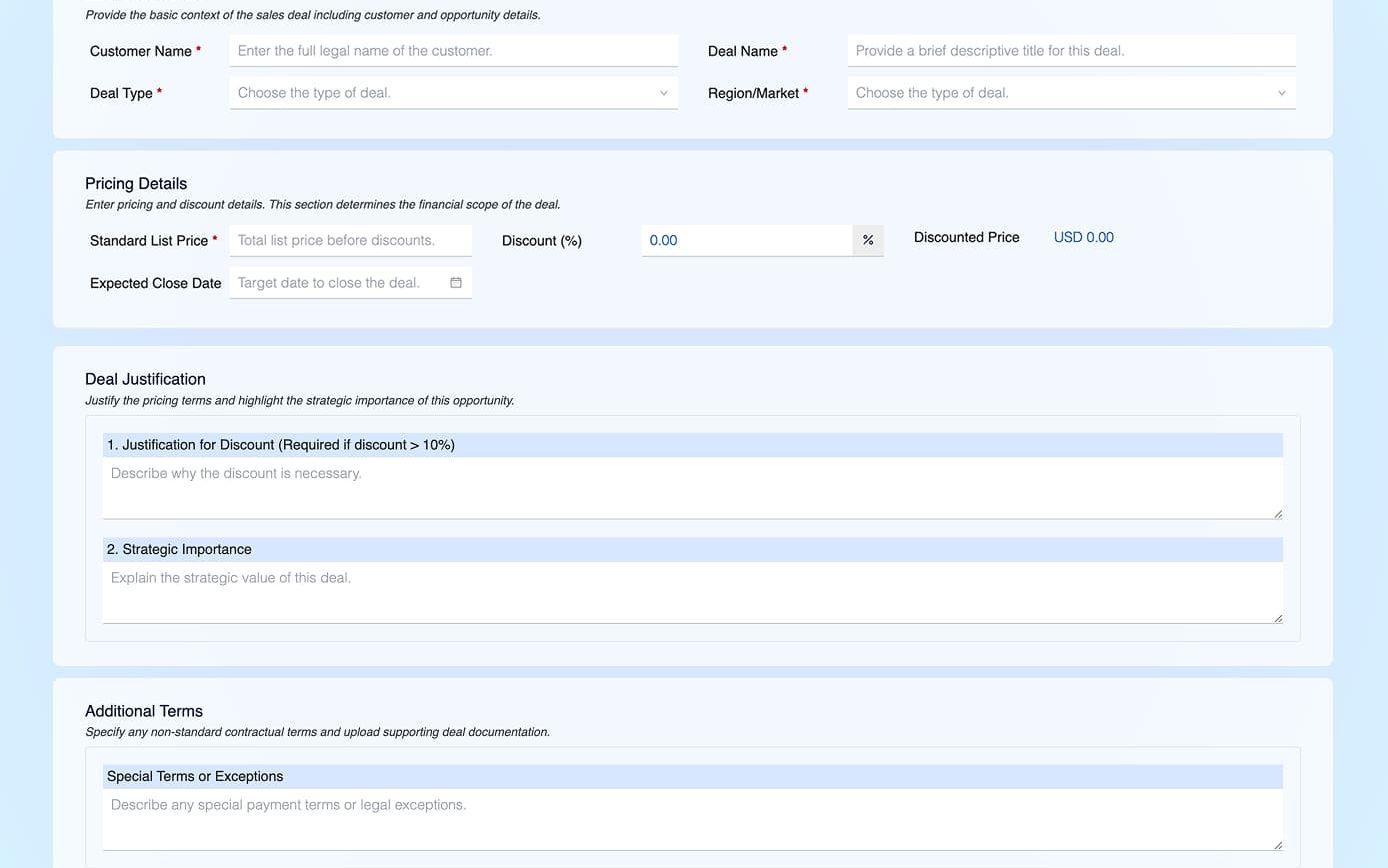
Sales Deal/Discount Approval preview screenshot 1

What this template helps teams build

Department: Sales (with involvement from Finance or Sales Operations, and sometimes Executive

oversight).

Industries: Common in B2B industries like enterprise software, equipment manufacturing, or services

where sales reps have flexibility to offer custom pricing or terms. Any company with a formal process for

approving discounts, special pricing, or non-standard sales contracts would use this. For example, a SaaS

software company might require approval for any discount above 20%, or a manufacturing firm might need

VP approval for deals with low profit margin.

Purpose: To control and expedite the approval of special sales terms, such as discounts beyond a certain

level, custom contract terms, or large deals. This ensures profitability isn’t compromised and that any non-

standard terms are reviewed. Yeeflow allows sales reps or account managers to submit deal approval

requests that automatically route to the right approvers (e.g., sales director, finance, legal). The process

accelerates deal cycles by making approvals systematic, while protecting the company’s financial interests.

Workflow: A typical sales deal/discount approval process:

1. Deal Submission by Sales Rep: The salesperson enters the request via a Yeeflow form. They include deal

specifics: customer name, deal value, standard price vs proposed price or discount percentage, any special

terms (like extended payment terms, added services), and reasons/justification (e.g., “competitive situation

requires 25% discount to win”). They might attach the draft quote or proposal as well.

2. Sales Manager Approval: The first stop is usually the rep’s direct sales manager. The manager reviews if

the deal makes sense – is the discount justified and still within acceptable margin? The manager might have

guidance like only approve if margin is above X%. The manager approves if they agree with the rationale or

they might negotiate changes (e.g., “I’ll approve a 15% discount, not 25%”). If rejecting, they likely ask the

rep to adjust the quote.

3. Finance Approval: Once the manager approves, often Finance (or a Commercial Operations team) must

approve significant discounts. They double-check the profitability and whether the deal meets financial

policies. For instance, finance ensures that the discounted price still covers costs or that multi-year deals are

properly valued. They may run calculations or check if this customer has any credit issues. Yeeflow could

present them with data from pricing systems if integrated. Finance then approves or requests changes (like

“we can’t approve payment terms beyond 60 days” etc.).

4. Executive or Special Approval: Depending on thresholds, additional approvals might be needed.

Examples: if the discount is extremely high (say >40%), perhaps the VP of Sales or even the CEO must sign

off. Or if the contract has non-standard legal terms (like an unusual liability clause the customer wants), the

Legal department might be roped in to approve those terms. Yeeflow can incorporate these conditionally:

e.g., if the rep indicates “non-standard terms attached” on the form, it routes to Legal; if discount > X, route

to VP Sales.

5. Approval Outcome: If all required parties approve, Yeeflow notifies the sales rep that the deal is

approved to proceed. The rep can then send the final quote or contract to the customer, now with the

14confidence all internal approvals are done. If any approver rejects or modifies the request, that feedback

goes to the rep, who can revise the deal structure and resubmit if possible.

6. Integration to Quoting/CPQ (optional): In some setups, Yeeflow might integrate with a CPQ (Configure

Price Quote) tool or CRM. For example, once a deal is approved, Yeeflow could update the opportunity in

CRM with an “approved discount” status. Or Yeeflow can pull in data like the standard pricing automatically

when the rep fills the form (to calculate the discount %). This ensures the process is embedded in the sales

workflow seamlessly.

Example: A software company uses Yeeflow to manage approvals for any deal over \$100k or any discount

over 20%. A sales rep in Europe submits a big deal with a 30% discount to win a major client. Yeeflow routes

it: the EMEA Sales Director approves it (given the strategic importance), then Finance receives it and flags

that the 30% discount pushes the margin slightly below target. The CFO (triggered because the deal value is

high) reviews the scenario and decides to approve given the long-term strategic value, but notes to limit

certain contract terms. All this happens within Yeeflow in a day, and the rep gets the green light. Previously,

the rep would have had to chase three different leaders via email over a week. Now Yeeflow’s role-based

approval routing handles it systematically 30

. The company also integrated Yeeflow with their document

signing tool (like PandaDoc or Adobe Sign) – once the deal is internally approved, the contract is

automatically sent out for e-signature to the client (Yeeflow’s blog highlights such integrations for

streamlining sales documents) 31

. This cohesive process has made their sales cycle faster and ensured that

every big discount is reviewed for financial soundness. In short, Yeeflow helps the sales team close deals

faster while giving management control over pricing and terms.